FIFINE Gaming Headphones: Useful Controls for Streamers?
The FIFINE Wireless ANC Over-Ear Headphones put gaming mode, ANC, transparency, wired playback, and mic flexibility directly on the headset.
Affiliate disclosure: As an Amazon Associate I earn from qualifying purchases. This article may contain affiliate links, which means I may earn a commission at no extra cost to you.
The FIFINE Wireless ANC Over-Ear Headphones are aimed at a person who does not want one pair of headphones limited to one job. I handled this pair with gaming, calls, music, laptop listening, and travel in mind, and the appeal is mostly in the physical design and the controls. The cushions are soft, the headband expands, the earcups swivel, and the headset puts ANC, transparency, bass, and gaming-mode functions within reach on the earcup.
That makes these FIFINE gaming headphones more interesting than a simple wireless pair with only power and volume buttons. I like being able to change an everyday setting without pausing what I am doing to dig through a device menu. The temporary transparency shortcut is especially practical: it is intended for those brief moments when I need to hear what is around me but do not want to take the headphones off or fully change my listening routine.
For streamers and multiplayer players, there is another layer of flexibility. The headset has a built-in microphone pickup, and I also found a connection for a gaming-style microphone. Add USB-C charging and an included cable for direct device connection, and this is clearly designed to move between wireless and wired situations rather than forcing one approach.
A practical pick for gamers and streamers who want soft over-ear comfort, direct ANC/transparency controls, a wired fallback, and a quick gaming-mode shortcut. I liked the physical design and control options; I would still choose based on your own sound and microphone priorities.
As an Amazon Associate I earn from qualifying purchases.
| Type | Wireless over-ear headphones |
|---|---|
| Noise control | ANC on, ANC off, and transparency |
| Gaming feature | Three-tap gaming-mode control |
| Connectivity | USB-C charging and included wired connection cable |
| Microphone options | Built-in pickup plus external gaming-mic connection |
| Fit features | Expandable headband and swiveling earcups |
Why these FIFINE gaming headphones suit a flexible desk setup
A streaming or gaming desk can get complicated quickly. There may be a computer, a laptop, a phone, a controller, a microphone, and people nearby who occasionally need your attention. I do not think every headphone needs every possible feature, but the useful features should be accessible when they matter. On this pair, the core controls are on the headphone rather than hidden away.
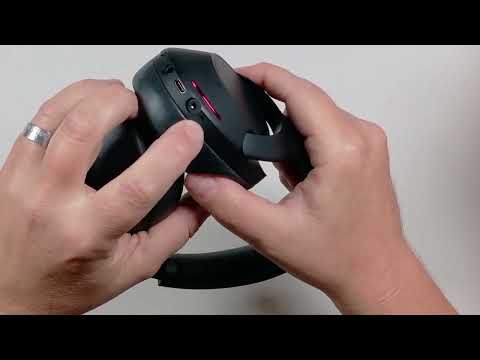
The basic layout is straightforward. I identified a power control, volume-up and volume-down controls, and a noise-control button. Those are the controls I would expect to use routinely. A good physical control layout is not glamorous, but it can make a headset easier to live with. When I am already playing, working, or listening, I would rather make a quick adjustment by touch than interrupt the moment to find a software setting.
The left and right earcups are also marked. This is a small point, but it belongs in a hands-on review because it contributes to the everyday experience. I could identify the intended side immediately rather than wondering which earcup had to face which direction. For someone who frequently puts headphones on and takes them off between tasks, tiny design cues like that are welcome.
The broader benefit is choice. The headphones can be used wirelessly, but they also come with a cable for connecting directly to a device such as a laptop. I see that cable as a practical fallback, not a reason to abandon wireless use. It can be useful when I want a direct connection available at a desk, on a laptop, or while traveling. The transcript does not specify the cable type, connector, or detailed compatibility, so those are points to confirm for a particular device before buying.
There is USB-C charging on the headset as well. That is the charging connection I found while looking over the earcup. I did not measure battery life or charging time, so I cannot make a battery-runtime recommendation from this hands-on look. If all-day unplugged use is the deciding factor, confirm the current listing details and compare them with your own schedule.


My hands-on take on fit, movement, and comfort
Fit is the first thing I notice with over-ear headphones, because feature lists do not help much if the earcups press awkwardly against my ears. I found these cushions very soft and cushiony, and my ears fit comfortably inside the earcups. That is a positive starting point for the over-ear design. The opening accommodated my ears rather than sitting directly on them.
The headband expands, which I showed as a useful adjustment for a larger head. It is a simple mechanical feature, but it gives the headphones room to adapt to different fits instead of asking everyone to settle for the same fixed size. The earcups also swivel. That movement gives the headset more positioning flexibility when I am putting it on and helps the overall design feel less rigid.
Those observations support a comfort-and-fit advantage, but they have a sensible limit. I handled the cushions, expansion, and swivel design directly; I did not test long-session comfort over hours. Comfort is personal, especially for people who wear glasses, prefer a particular clamp feel, or have different ear shapes. I would treat the soft cushioning and adjustable design as encouraging physical traits, not a guarantee that every buyer will feel the same way after a long session.
Still, I think the physical design is one of the better reasons to consider this model. The soft cushions, expandable top, and swiveling earcups work together as a package. A headset can have great controls, but it needs enough adjustment to make those controls worth using. Here, I liked that the fit features were not an afterthought.
ANC and transparency make the headset easier to use around people
The noise-control button cycles through three settings: ANC on, ANC off, and transparency mode. That gives you a clear choice based on what is happening around you. ANC is the setting for times when you want less outside distraction. ANC off is available when you do not need noise control. Transparency goes in the other direction by bringing surrounding sound through while you continue listening.
Transparency is the mode I find easiest to understand in real life. If someone speaks to me, an announcement begins, or I need to know what is happening nearby, I may not want to remove the headphones entirely. The feature is intended to let outside sound in while audio continues. That can be useful at a desk, in shared spaces, or while traveling.
I also found a temporary transparency shortcut. By holding a finger on the earcup control, I can temporarily enter transparency mode; releasing the control returns the headphones to regular sound. I like the logic of that interaction because it addresses a short interruption without requiring repeated cycling through every available mode. It is a useful distinction: a full noise-mode change makes sense when the environment has changed, while a temporary shortcut makes sense for a quick exchange.
I did not evaluate how strongly ANC reduces particular sounds, how natural transparency sounds, or how either mode performs in a loud environment. Those are performance questions that go beyond the direct control demonstration. What I can say is that the three modes and the momentary shortcut are present and easy to frame around everyday needs.
Gaming mode, bass toggle, and audible feedback stay on the earcup
FIFINE adds two gesture-driven controls beyond the standard buttons. A double tap toggles the bass setting. When the setting changes, the headphones provide audible tones. A three-tap gesture activates gaming mode, and that change also has an audible confirmation tone.
The confirmation tones matter more than they might seem. Tap controls can be frustrating if I have no clue whether the gesture registered. Here, the headset gives feedback instead of leaving me to guess. That is particularly helpful for a three-tap gaming-mode gesture, where the difference between a deliberate input and a missed input would otherwise be hard to tell while the headphones are on my head.
Gaming mode changes latency, according to the hands-on source. The most useful part of this feature for a gamer is its direct access: I can activate it with the earcup gesture rather than hunting for a setting somewhere else. For a mixed-use pair that may spend part of the day on music or calls and part of the day on a game, that is a sensible control arrangement.
I did not benchmark latency or compare gaming mode against another headset, so I cannot put a number on the difference or promise a specific competitive-game result. Buyers who need a headset for serious latency-sensitive play should keep that distinction in mind. The supported takeaway is that there is a dedicated gaming-mode control, it changes latency, and it confirms activation audibly.
The bass toggle follows the same convenience-first philosophy. It is a quick option rather than a detailed sound-profile system described in the source. I did not assess sound quality, bass character, codec support, or the overall sound signature, so I would not choose this model solely from a claim about audio tuning. Instead, I see the bass gesture as one more directly accessible adjustment for people who like to change listening preferences without leaving what they are doing.
+ Pros
- Soft, cushioned over-ear fit that accommodated my ears well
- Expandable headband and swiveling earcups add fit flexibility
- Built-in microphone pickup plus a connection for a gaming-style microphone
- ANC, ANC-off, and transparency listening options
- Three-tap gaming-mode control with audible confirmation
- Included wired connection option for devices such as laptops
! What to know
- Gaming mode, bass toggle, and temporary transparency are controlled from the earcup with tap or press-and-hold gestures.
- The headphones provide audible tones to confirm control changes.
- Check the specific package details if you need an external gaming-style microphone.
Microphone flexibility matters for streamers, but confirm the details
One feature that separates these from a very basic wireless headphone is the microphone arrangement. I identified a built-in microphone pickup on the headset, and there is also a port for connecting a gaming-style microphone. That creates two possible routes for communication: use the onboard pickup or connect a compatible gaming-style mic if that better suits the setup.
For a streamer, this does not replace the need to think through the whole audio chain. Some people already use a dedicated desktop microphone. Others want the simplicity of speaking through a headset. Some multiplayer players simply want an available option while moving between a laptop, a game, and calls. The value here is flexibility rather than an assumption that one microphone approach works for everybody.
I did not test microphone clarity, external microphone compatibility, or whether an external gaming-style microphone is included with every package. The source also does not identify the microphone connection standard or supported devices. If that external-mic option is central to your purchase, verify package contents and compatibility before ordering. That is not a flaw in the physical feature itself; it is a purchase detail that deserves confirmation.
The included wired connection also belongs in this setup conversation. A direct cable connection can be useful for a laptop or another device when wireless is not the preferred route. I would not assume every device works identically without checking the relevant connection details, but I appreciate having a wired option available rather than being locked into one listening method.
Who should consider the FIFINE Wireless ANC Over-Ear Headphones?
I would consider these FIFINE gaming headphones if I wanted an over-ear pair that is focused on comfort, control access, and general flexibility. The strongest supported reasons are the soft cushions I handled, expandable headband, swiveling earcups, noise-mode choices, quick temporary transparency, wired fallback, and easy-access gaming mode.
They make particular sense for a gamer or streamer whose setup changes during the day. You might be at a computer for a game, then connect to a laptop, take a call, listen to music, or use the same headphones while traveling. The feature set does not force the product into only one of those roles. ANC and transparency support different surroundings, while the cable gives you another connection path when one is useful.
I would also look at them if the external gaming-style microphone connection appeals to you. The presence of both a built-in pickup and an external-mic option gives buyers more than one route to consider. Just do the compatibility check first if that port is the reason you are choosing this model.
On the other hand, I would narrow the search further if audio quality, proven microphone clarity, quantified low-latency performance, Bluetooth reliability, battery life, charging speed, or water and sweat resistance are your non-negotiables. I did not test those areas here, and the supplied hands-on material does not establish them. A shopper whose decision rests on any of those points should seek confirmed details before treating these as the final choice.
Specs
| Spec | Detail |
|---|---|
| Headphone style | Over-ear |
| Charging connection | USB-C |
| Noise-control modes | ANC on, ANC off, transparency |
| Gaming mode | Activated by three taps on the earcup |
| Bass control | Double-tap toggle |
| Awareness shortcut | Press and hold for temporary transparency |
| Wired use | Included cable for direct device connection |
| Microphone | Built-in pickup and external gaming-style microphone connection |
Scorecard
Soft cushions, an expandable band, and swiveling earcups stood out.
Noise modes, bass, gaming mode, and temporary transparency are on the headset.
Useful combination of wireless use, wired fallback, and awareness modes.
Gaming mode and microphone options are practical for a mixed-use setup.
FAQ: FIFINE gaming headphones controls and connectivity
Do the FIFINE Wireless ANC Over-Ear Headphones have a gaming mode?
Yes. I activated gaming mode with a three-tap earcup gesture. The headphones give an audible confirmation tone, and gaming mode changes latency. I did not benchmark that latency change, so I cannot quantify its performance in a particular game.
Can I use these FIFINE headphones with a cable?
Yes. A cable is included for connecting the headphones directly to a device such as a laptop. This gives you a wired option in addition to wireless use. The supplied source does not specify the cable type or every compatible device, so verify those details for your setup.
Do these headphones have ANC and transparency mode?
Yes. The noise-control button offers ANC on, ANC off, and transparency mode. There is also a press-and-hold earcup shortcut for temporary transparency; releasing the control returns the headphones to normal sound.
Can I connect a separate microphone?
There is a connection for a gaming-style microphone, and the headset also has a built-in microphone pickup. Confirm package contents, microphone compatibility, and device support if an external microphone is essential to your setup.
Are the earcups comfortable?
I found the cushions soft and roomy enough for my ears. The headband expands and the earcups swivel, which adds fit flexibility. I did not test all-day wear, so individual long-session comfort may vary.
How do I change the bass setting?
A double tap on the earcup toggles the bass setting. Audible tones indicate that the setting changed. The source does not provide a detailed sound-quality comparison between the settings.
Final recommendation
The FIFINE Wireless ANC Over-Ear Headphones are a sensible all-around option if you value soft over-ear fit, direct controls, and connection flexibility more than a stripped-down design. I liked the cushioning, adjustable physical design, wired fallback, and the way ANC, transparency, bass, and gaming mode are handled from the headset itself.
For gamers and streamers who want one pair to cover calls, laptop listening, games, and travel, this is a practical feature set. I would make the purchase decision with realistic expectations: the physical features and controls are the clear strengths I handled directly, while sound quality, microphone performance, latency results, and battery behavior remain things to verify based on your personal priorities.
As an Amazon Associate I earn from qualifying purchases.