Behringer XENYX X1222USB Streaming Mixer: Worth It?
The Behringer XENYX X1222USB streaming mixer gives creators physical microphone EQ control. I used a Behringer mixer for years with my Heil PR 40, and that practical control is the point.
Affiliate disclosure: As an Amazon Associate I earn from qualifying purchases. This article may contain affiliate links, which means I may earn a commission at no extra cost to you.
The Behringer XENYX X1222USB streaming mixer is the kind of gear that makes sense when I want microphone controls in front of me instead of buried inside software. I used a Behringer mixer as part of my Heil PR 40 setup for a couple of years. Its role in that setup was straightforward but important: it gave me a way to connect the microphone and adjust the lows, mids, highs, and other audio settings to suit what I wanted to do.
That is the useful lens for evaluating this mixer. The X1222USB is not simply an extra box to add because a streaming desk looks more complete with faders and knobs. It is a desktop analog mixer for someone who wants a physical place to manage microphone tone and potentially connect more sources over time. In my own use, the immediate access to tonal controls was the reason it earned its space.
A sensible choice for creators who want a physical mixer to connect a microphone and shape its lows, mids, and highs. It worked well in my Heil PR 40 setup for years, but buy it for hands-on audio control—not features you may never use.
As an Amazon Associate I earn from qualifying purchases.
Who should consider the Behringer XENYX X1222USB streaming mixer?
I would consider this mixer if I were building a podcast, livestream, voiceover, or general creator setup around an XLR microphone and wanted direct control over the sound. My Heil PR 40 needed a mixer of some sort in my setup, and the Behringer was the mixer I chose. Rather than treating the microphone chain as something to set once and ignore, I could reach the controls and make adjustments from the board.
That approach is especially appealing to people who prefer a hands-on workflow. If I want less low end, I can adjust it. If I want to alter the mids or highs, the controls are there. It is a basic idea, but it matters when preparing to record or go live. I do not have to make every small tonal decision through menus or a separate software panel.
The X1222USB is also a better conceptual fit for a desk-based setup than for a minimal one-microphone rig where saving space is the top priority. A compact interface can be a simpler answer when all I need is one microphone connection and a small control set. This is the option for someone who specifically wants a mixer on the desk and expects to use a broader physical control surface.
It is worth separating “more capable” from “more appropriate.” A larger mixer can offer room for a changing setup, but that does not automatically make it the best purchase for every streamer. The best reason to choose this model is that its controls solve a real workflow need: connecting a microphone and having practical access to its sound settings. If that need is absent, the size and feature set may be unnecessary rather than helpful.
| Best for | Creators who want hands-on microphone EQ control |
|---|---|
| My use | Heil PR 40 microphone setup |
| Mic tone control | Low, mid, and high adjustments |
| USB function | Advertised USB/audio interface |
| Format | Corded desktop analog mixer |
My Heil PR 40 setup experience
I had used this Behringer mixer for a couple of years in my microphone setup at the time I discussed it. It worked well for the job I needed it to do. I could plug in my Heil PR 40, set the low, mid, and high frequency controls to my preferences, and change broader audio settings from the mixer itself.
Those are the observations that matter most in a streaming-focused review. I was not choosing the mixer just to have a list of features. I was using it as a working part of the microphone chain. The mixer was present in my recording setup, and I described it as doing great stuff for my particular setup. That longer-term use gives the recommendation more value than a quick impression based only on handling the unit for a few minutes.
My use was centered on voice and control rather than on trying every advertised feature. The low, mid, and high adjustments were the controls I called out because they let me tailor the microphone sound the way I wanted. Different voices, rooms, and content formats can call for different tonal choices. A physical EQ section does not make those decisions for me, but it gives me an immediate way to make them.
I also like the practical rhythm of a hardware mixer in a permanent setup. The microphone is connected, the controls are in a known place, and I can return to them whenever I need to revisit the sound. That does not mean physical controls are automatically superior for everyone. It means they were useful in my workflow, where the mixer was part of the system rather than an occasional accessory.
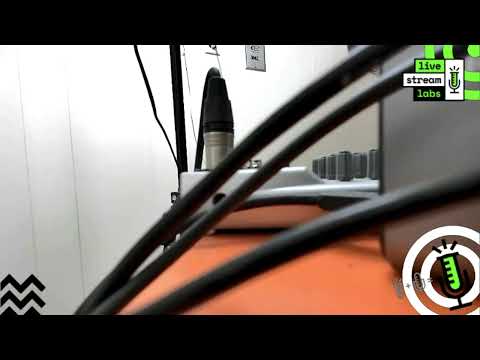
The mixer was only visible briefly and at a distance when I discussed it, so my firsthand comments should be read for what they are: real setup experience with a Behringer mixer identified in the supplied product context as the X1222USB, not a close-up walkthrough of every control or connection. The strongest evidence here is my repeated use with the PR 40 and my direct description of the low, mid, high, and overall audio adjustments.


Why physical low, mid, and high controls matter for streaming
The most relevant benefit of this mixer for a streamer is not that it has a large number printed in its input description. It is that the low, mid, and high controls give me a tangible way to shape the microphone tone. When I am working through my audio settings, I can make a change on the mixer rather than treating the entire process as a computer task.
That is useful because microphone audio is not one-size-fits-all. A setting that feels right in one room or for one voice may not be the setting I want in another situation. The availability of low, mid, and high adjustment means I can work toward the sound I prefer from the hardware that is already handling the microphone connection.
There is an important limit to that benefit. A mixer cannot replace sensible microphone technique, appropriate placement, or avoiding excessive levels. It is a control tool, not a magic fix for every audio problem. For me, its value was the ability to make tonal and audio-setting changes deliberately as part of the setup.
This distinction also helps with buying decisions. Someone who enjoys learning the basics of gain and EQ may get a lot of use from direct controls. Someone who wants to connect a mic, leave everything untouched, and keep a desk as clear as possible may be happier with a more compact device. Neither approach is wrong; they are different workflows. The X1222USB favors the person who sees the mixer as an active part of the process.
Advertised feature range versus the functions I used
The supplied listing markets the X1222USB as a 16-input, 2/2-bus analog mixer with USB/audio-interface functionality. It also advertises four phantom-powered XENYX microphone preamps, four one-knob compressors, British-style three-band EQ, and a 24-bit multi-effects processor with 16 editable presets. The listing further describes ultra-low-noise, high-headroom analog operation.
Those advertised features make the product potentially relevant to a larger desktop audio setup. Multiple microphone preamps could matter to a buyer planning several mic sources. Compressors and effects may appeal to someone looking for onboard processing, while USB/audio-interface functionality can be an important consideration for a computer-based workflow. The point is not that every buyer must use every feature. The point is that a mixer with this feature range should be purchased with a clear idea of which parts will genuinely serve the setup.
My firsthand use discussed here did not include the USB/audio-interface function, phantom power, onboard compressors, or effects processor. I cannot say how those functions performed in my setup. I would not make them the primary reason to buy based on my experience alone. They are manufacturer and retailer listing claims that may be useful to investigate against the specific microphones, sources, and workflow a buyer plans to use.
There is also a channel-count detail to check before ordering. I described my Behringer as a four-channel mixer, while the supplied X1222USB title and listing call it a 16-input model and advertise four microphone preamps. Those descriptions can reflect different ways of counting a mixer’s available paths and connections, but my source material does not explain the distinction. I would verify the actual input layout against every microphone and source I expect to connect instead of relying on a single number alone.
+ Pros
- Physical low, mid, and high EQ controls for fast microphone tone changes
- Worked well in my Heil PR 40 microphone setup over multiple years
- Desktop mixer format gives creators direct access to audio controls
- Manufacturer advertises USB interface capability, four mic preamps, compressors, and multi-effects
! What to know
- This is a full-size corded desktop mixer, not a compact single-mic interface.
- My firsthand use focused on microphone connection and EQ adjustments; I did not use the USB interface, compressors, phantom power, or effects in this setup.
- The listing calls it a 16-input model while my setup description called it four-channel; verify the input layout for your planned sources.
Desk space, permanence, and setup expectations
This is a corded desktop mixer, not a small interface that disappears beside a laptop. The supplied listing gives dimensions of 18.3 by 15.7 by 5.95 inches and a weight of 8.2 pounds. Those numbers matter because they set expectations before it arrives: I would plan a dedicated place for it instead of assuming it will fit into an ultra-minimal streaming arrangement.
That footprint is a trade-off, not automatically a negative. A larger desktop format is part of why there is room for a physical control surface and a broader collection of advertised connections and processing features. For a permanent streaming or recording desk, that can be exactly the appeal. I can leave the microphone connected and return to the same controls from session to session.
For travel, temporary workstations, or a setup that must be packed away after every stream, the calculation changes. The X1222USB may be more mixer than I want to move, store, and reconnect for a one-mic job. Buyers should decide whether they are building a stable audio station or trying to preserve maximum portability. The answer has as much to do with the desk and workflow as it does with the microphone.
Power is another practical consideration because the listing identifies it as corded electric. That suits a fixed desk where power and cable routing are already part of the plan. It is less aligned with a stripped-down, grab-and-go setup. Thinking through where the mixer will live, what it will connect to, and whether its controls will be used regularly is more useful than buying solely on the promise of future expansion.
How I would decide between this mixer and a smaller interface
I would start with the microphone chain. If I have an XLR microphone such as the Heil PR 40 and need a mixer or external audio control as part of the setup, the Behringer approach is sensible. My own experience confirms that it handled that role well for me over multiple years. The ability to adjust lows, mids, highs, and other settings directly was not theoretical; it was how I used it.
Next, I would ask whether physical EQ is something I will actually touch. If the answer is yes, a desktop mixer offers a very different experience from a minimalist interface. It places the controls where I can reach them. If the answer is no and I only want basic microphone connection and gain management, I would seriously consider a smaller alternative because it may better match the simplicity of the rest of the setup.
Finally, I would treat the advertised extras as a planning question, not a reason to overbuy. More inputs, preamps, compression, effects, and USB capability may matter if they match the work I intend to do. If they do not, then the core reason to choose this mixer remains hands-on microphone control. That is a good reason when it matches the workflow, and it is the reason supported most clearly by my own use.
Specs
| Spec | Detail |
|---|---|
| Product type | Analog mixer with advertised USB/audio-interface functionality |
| Advertised input configuration | 16-input, 2/2-bus |
| Microphone preamps | 4 advertised phantom-powered XENYX preamps |
| EQ | Advertised British-style 3-band EQ |
| Dynamics | 4 advertised one-knob compressors |
| Effects | Advertised 24-bit processor with 16 editable presets |
| Dimensions | 18.3 x 15.7 x 5.95 inches (listing) |
| Weight | 8.2 pounds (listing) |
Where the X1222USB fits in a live-streaming workflow
For a streamer, the mixer can sit at the point where microphone choice and presentation meet. The microphone captures the voice, while the mixer gives me direct access to settings that help me shape how that voice is handled in the setup. I used it with my PR 40 because I needed a mixer of some sort, and the Behringer gave me the controls I wanted.
That makes it particularly relevant to creators who do not want audio to feel like an afterthought. I am not saying every stream requires a full desktop mixer. I am saying that creators who want to be involved in their microphone tone can benefit from having a dedicated hardware control point. The low, mid, and high adjustments I used are immediately understandable and useful in that context.
It can also make sense for someone planning a more involved desk over time, provided the advertised inputs and functions match the planned gear. Before buying, I would list the microphone, computer connection needs, additional sources, available desk area, and the features I truly expect to use. That simple check helps prevent both underbuying and buying a complex mixer only because it seems more serious than a smaller option.
My bottom line remains narrow and practical: this was a successful part of my microphone setup, not a product I am recommending on speculation. It did great stuff for me because it let me connect the PR 40 and control the audio settings I cared about. For a creator with that same need, that is meaningful evidence.
Scorecard
Physical low, mid, and high adjustment was central to my setup.
Worked well for my PR 40 setup over multiple years.
USB, compressors, effects, and four mic preamps are advertised.
A full-size desktop mixer needs dedicated space.
Useful, but a smaller interface may suit minimal setups better.
Behringer XENYX X1222USB streaming mixer FAQ
Is the Behringer XENYX X1222USB good for streaming?
It can be a good fit for streaming when I want hands-on microphone control. In my setup, I used a Behringer mixer with a Heil PR 40 and adjusted lows, mids, highs, and other audio settings directly from the board. It is best suited to someone who wants a physical mixer as part of the desk workflow.
Can I use the X1222USB with an XLR microphone?
Yes. I used my Behringer mixer with a Heil PR 40 microphone. The supplied listing also advertises four XENYX microphone preamps with phantom power. Whether phantom power is needed depends on the particular microphone, and I did not use or assess that function in the setup discussed here.
Does the X1222USB have USB audio-interface capability?
The manufacturer and retailer listing say that it has USB/audio-interface functionality. My use described here focused on microphone connection and the physical low, mid, and high controls, so I cannot speak from firsthand experience about USB operation.
Is the X1222USB too much mixer for one microphone?
It can be, depending on the desk and workflow. If I only need a single mic connection with very basic controls, a compact interface may be easier to accommodate. This mixer is a better match when I value physical EQ, want a larger control surface, or expect the advertised additional connections and features to serve a real purpose.
Why do the product details mention 16 inputs while my experience calls it four-channel?
I called the Behringer in my setup a four-channel mixer, while the supplied X1222USB listing describes a 16-input model and advertises four mic preamps. The source material does not clarify the counting convention. I would check the input layout directly against the sources I plan to connect.
Final recommendation
I would recommend the Behringer XENYX X1222USB streaming mixer to a creator who wants to build around a physical mixer and actively shape microphone tone. It served me well over multiple years with my PR 40, and the low, mid, and high controls were the practical reason it earned a place in my setup.
I would not buy a larger mixer just because more knobs look professional. I would buy it when those knobs solve a workflow problem. If I want hands-on control, have room for a corded desktop mixer, and can make use of more than a bare-bones microphone chain, this is a sensible direction. If my priority is a tiny, simple, single-mic setup, I would look for something smaller instead.
As an Amazon Associate I earn from qualifying purchases.