USB-C Wireless Lavalier Mic for Phone Video?
A compact two-mic USB-C wireless lavalier set with quick phone pairing, useful adapters, strong magnetic clips, and pleasantly clear phone audio.
Affiliate disclosure: As an Amazon Associate I earn from qualifying purchases. This article may contain affiliate links, which means I may earn a commission at no extra cost to you.
A USB-C wireless lavalier microphone needs to make mobile recording easier, not turn a short video into an audio-routing project. This two-transmitter set kept the basic process refreshingly simple in my hands: I connected the receiver/accessory to my phone, powered on one mic, saw it pair quickly, and recorded through the phone’s USB microphone input. Playback had really nice sound to me. It also worked as a USB audio source on my computer in OBS.
What makes this particular kit more interesting than a bare-bones phone mic is the collection of practical extras. The box included mounting magnets, wind socks, spare pop filters, a dual charging cable, and adapters for USB and Apple-style connections. I also found the magnetic mounting system strong and easy to reposition. The main operational limitation is important, though: when I connected the receiver/accessory to its charging cable, the phone connection dropped.
This is a solid compact USB-C wireless lavalier microphone set for phone video and basic computer recording. I liked the quick connection, clear phone playback, strong magnetic clips, and unusually complete accessory bundle. Just remember: charging the connected receiver interrupts the phone connection.
As an Amazon Associate I earn from qualifying purchases.
Who should consider this USB-C wireless lavalier microphone?
I would consider this set if I record video on a USB-C phone and want a more direct path to better voice pickup than relying on the phone from a distance. It makes the most sense for talking-head clips, product videos, casual walk-and-talk footage, basic podcast-style recordings, and any situation where I want the microphone closer to the person speaking without putting a desktop microphone in the shot.
It is also a sensible option for a simple computer workflow. I connected it to my computer, selected it as an audio source in OBS, and watched the incoming level while I spoke. That is useful for someone who occasionally switches between phone recording and computer recording and does not want separate microphone systems for each job.
The two-transmitter design gives the kit flexibility, but it does not mean I would automatically power up both mics every time. For a one-person recording, I kept one transmitter off. Two microphones listening to the same person can create odd duplicate audio, so the second transmitter is better treated as a spare in that workflow. I did not test this kit in a two-person recording, so I cannot say how it handles two separate voices in a finished recording.
This is not positioned in my setup as a complicated production system with lots of adjustments to manage. Its appeal is the compact hardware, the direct connection approach, and the ability to place the mic where it is useful. If those are the priorities, the kit has a lot going for it.
| Type | Two-transmitter USB-C wireless lavalier set |
|---|---|
| Phone recording | Recognized as a USB microphone in my phone test |
| Computer use | Worked as an audio source in OBS |
| Mounting | Strong adjustable magnetic clothing clips |
| Controls | Onboard mute and noise reduction |
| Included connections | USB-C, USB, and Apple-style adapter options |
My setup experience: quick phone pairing and clear playback
Opening the package, the first thing I noticed was the size of the two microphone transmitters. They were small and very light in my hands. That is meaningful for a lavalier-style mic because a bulky transmitter can tug at a shirt, look distracting on camera, or become uncomfortable during a longer recording. These are designed to be easy to keep out of the way.
The box was also more complete than I expected from such a compact set. Along with the two microphones and the receiver/accessory for a phone or computer, I found two spare pop filters, two wind socks, magnetic clothing clips, a dual USB-to-USB-C charging cable, a USB-C-to-USB adapter, and a USB-C-to-Apple-style adapter. Rather than assuming every buyer has the right adapter already, this package gives me several connection and accessory options immediately.
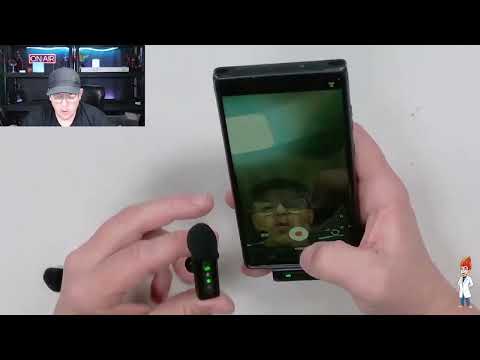
For the phone check, I powered on one transmitter and connected the receiver/accessory to my phone. I watched the indicator lights as the connection settled, and pairing appeared quick. Once I started a video recording, my phone displayed that it was recording through a USB microphone. That confirmation matters because it tells me the external mic path is active rather than leaving me to guess whether the phone’s built-in microphone is still handling the audio.
I then played the recording back through the phone. The sound was really nice to me. That is a subjective impression, but it is the most important practical result from the phone test. A bundle can include every cable and clip imaginable, yet the mic still has to produce voice audio I would want to use. In this recording, it did.
I would still keep that impression in its proper context. I did not make a model-to-model comparison, measure noise, or establish a universal sound-quality ranking. The phone playback was a real, useful check of the basic workflow and the resulting voice audio in my setup. It is not a claim about how every phone, room, or voice will sound.
What the accessory bundle changes in daily use
The included accessories make this feel like a kit rather than just two transmitters in a box. The USB-C-to-USB adapter gives me an option when I need a standard USB connection. The USB-C-to-Apple-style adapter broadens the connection options as well, though I did not establish compatibility across specific Apple devices. The dual USB-to-USB-C cable is convenient because it is one cable for charging the microphone units instead of two separate cables to track down.
The two wind socks and two spare pop filters are worthwhile extras to have on hand. The wind socks are especially relevant when recording outside, and the spare pop filters are helpful if I need replacements. I did not perform a dedicated outdoor wind test, so I would not make a performance promise for breezy or windy conditions. They are useful accessories, not a substitute for choosing a sheltered recording location when the weather is rough.
Magnetic mounting is one of the best reasons to choose it
The magnetic clips were a standout part of the package for me. I found the attachment strong when I tried it, and the microphone orientation could be adjusted instead of locking me into one angle. That sounds like a small detail, but it makes a real difference when I am trying to place a mic cleanly on a shirt while keeping it aimed sensibly toward my voice.
The most straightforward position is on a shirt. It keeps the transmitter near the speaker, where a lavalier mic belongs, and it avoids the distant sound that can happen when a phone is sitting farther away. I would use that placement for a seated explanation, a product demo, or a face-to-camera clip where the transmitter can be visible.
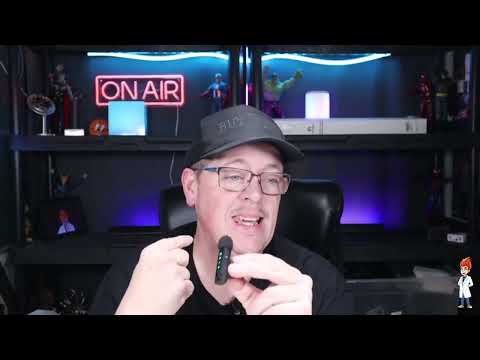
I also showed the microphone on the bill of a hat. That is an option I would consider when moving around, especially when I do not want a shirt-mounted transmitter getting bumped. Whether that is the right choice depends on the shot and whether the microphone is visible on camera, but it is good to have another usable mounting position.
For a less visible setup, I can put the magnetic clip underneath clothing and keep the microphone more concealed. That approach gives the kit some visual flexibility for on-camera work. Clothing type, fabric thickness, and movement can all affect placement, so I would always listen back to a short test clip before committing to an important recording. The key observation here is that the magnetic hardware was strong and gave me several practical placement choices.
Computer and OBS use: a straightforward USB audio source
After the phone recording, I moved the setup to my computer and used it as an audio source in OBS. I spoke with the microphone held roughly a foot from my face and watched the OBS meter. My voice reached the yellow-to-red area while I talked, confirming that the computer was receiving an active signal from the setup.
Holding a lavalier about a foot away is not how I would normally use it. The better everyday approach is to mount it on my shirt and keep it closer to my voice. Still, the computer check was useful because it verified the basic USB audio workflow and gave me a live view of incoming level behavior in OBS. For a basic streaming, desktop video, or recording setup, that is the kind of uncomplicated connection I want.
I did not establish ideal OBS gain settings, compare different recording software, or test every possible computer configuration. If I were preparing a recording where audio is especially important, I would make a short sample clip, monitor my levels, and adjust my placement before starting. That is good practice with any microphone, but it is especially easy to do here because the set worked as a direct audio source in OBS.
For someone who makes both mobile videos and computer content, the ability to move the same compact mic set between those workflows is a genuine convenience. The included USB-C-to-USB adapter is particularly relevant for that kind of switch, even though exact compatibility will depend on the device being used.
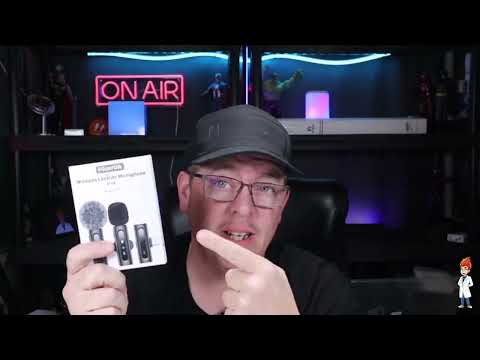
Onboard mute and noise reduction controls
The transmitters include controls that I can operate without reaching back to the phone or computer. A single press of the power button muted the microphone during my use. That is a genuinely useful feature for pausing audio during a setup change, a break, or an interruption. It keeps the control close to the person wearing the mic instead of requiring someone to find a software mute button.
There is also onboard noise reduction. I toggled it off and back on while speaking with an air conditioner running nearby. With the setting off, I noted that the air conditioner might be audible. I then returned the transmitter to its noise-reduction mode. Having the control on the transmitter is convenient because it lets me change the setting at the mic rather than digging through an app or menu.
I would not overstate what that brief test establishes. I did not quantify the difference, test noise reduction against several types of background sound, or determine how it affects every voice. Noise reduction can be helpful, but I would still start with the quietest practical room, place the microphone close to the speaker, and make a short test recording. Good placement and a quieter environment remain more reliable than expecting any one setting to solve a noisy recording space.
The charging behavior to plan around
The one product-level drawback I encountered is the receiver/accessory’s behavior when charging. When I connected it to its charging cable, I saw the red charging light come on. At the same time, it disconnected from my phone. That means I would not assume I can keep the receiver feeding audio to the phone during a charging session.
My practical advice is simple: charge before I record. If I know I am about to shoot phone video, I would make charging part of the prep rather than treating the cable as a way to extend the session with no interruption. This does not erase the kit’s strengths, but it is the one workflow detail that could catch someone by surprise if they need to record right away.
I also did not establish total charging time or battery runtime. Those are important buying questions for long sessions, and I would not invent an answer based on a brief connection check. If all-day use or extended shoots are central to the purchase decision, I would confirm those details separately before relying on this set for that role.
+ Pros
- Small, lightweight microphone transmitters
- Quick pairing to my phone
- Really nice sound on my phone playback
- Strong magnetic clips with adjustable orientation
- Useful bundle of adapters, wind socks, and extra pop filters
- Onboard mute and noise-reduction controls
- Worked as a USB audio source on my computer in OBS
− Cons
- Charging the connected receiver/accessory interrupted its phone connection
Where I would use this microphone set
This USB-C wireless lavalier microphone set is most appealing when I want my voice closer to the microphone than my phone can reasonably be. That includes quick phone videos, informal how-to content, product explanations, and short mobile recordings where I do not want to hold a microphone or put one on a stand.
- Phone video: I connected it, saw the USB microphone indicator during recording, and liked the phone playback sound.
- Talking-head and product clips: A shirt mount keeps the microphone near my voice while leaving my hands free.
- Walk-and-talk recording: The hat-bill placement gives me an alternative when movement makes a shirt mount less convenient.
- Basic OBS audio: I used it as a computer audio source and monitored incoming levels in OBS.
- Low-visibility on-camera placement: The magnetic clip can sit beneath clothing when I prefer a more concealed arrangement.
The kit is less compelling if I need verified long-runtime performance, fully documented compatibility with a particular device, a carefully measured noise-reduction result, or a tested two-person recording workflow. Those questions were outside my use here. For the core phone-and-computer tasks I did try, though, the setup was compact, quick to connect, and practical.
What I would check before buying
First, I would confirm the connector needs of my specific phone, tablet, or computer. The included USB-C, USB, and Apple-style adapter options are helpful, but I did not test every device class or model. A compatible physical connection is not the same as guaranteeing the same behavior on every device.
Second, I would decide whether I am buying this mainly for one person or two. There are two transmitters in the package, which is useful for flexibility and as a spare. But for a single speaker, I would use one transmitter at a time to avoid the duplicate-audio issue I noted. I did not test a two-person recording, so buyers who specifically need interviews should verify that use case for their own workflow.
Finally, I would build charging into my recording routine. Since the connected receiver/accessory dropped its phone connection when I attached the charging cable, preparation matters. That is an easy limitation to live with when I know it in advance, but it is not something I would want to discover midway through a planned phone recording.
Specs
| Spec | Detail |
|---|---|
| Microphones included | Two lightweight wireless transmitters |
| Receiver/accessory | Connects to a phone or computer |
| Phone interface observed | USB microphone recording |
| Computer workflow observed | USB audio source monitored in OBS |
| Mounting system | Magnetic clothing clips |
| Onboard controls | Mute and noise-reduction toggle |
| Accessories | Two wind socks and two spare pop filters |
| Adapters included | USB-C-to-USB and USB-C-to-Apple-style adapters |
| Charging cable | Dual USB-to-USB-C cable |
Scorecard
Paired quickly and recorded as a USB microphone.
Phone playback sounded really nice to me.
Strong magnetic clips support several placement options.
Adapters, windscreens, pop filters, and charging cable are included.
Charging the receiver/accessory interrupted my phone connection.
FAQ
Does this USB-C wireless lavalier microphone work with a phone?
It worked with my phone. After I connected the receiver/accessory and powered on one transmitter, pairing appeared quick from the indicator lights. When I recorded video, my phone identified the input as a USB microphone, and I thought the playback sounded really nice.
Can I use this microphone set with a computer and OBS?
Yes. I connected the setup to my computer, used it as an audio source in OBS, and monitored the incoming signal. With the mic held around a foot from my face, I saw my speaking level reach the yellow-to-red range on the OBS meter.
What comes in the box?
The package I received included two small wireless microphone transmitters, a receiver/accessory for connecting to a phone or computer, two spare pop filters, two wind socks, magnetic clothing clips, a dual USB-to-USB-C charging cable, a USB-C-to-USB adapter, and a USB-C-to-Apple-style adapter.
Does it have a mute button and noise reduction?
Yes. I used a one-press mute control on the transmitter and toggled the onboard noise-reduction setting while speaking. I did not quantify the noise-reduction effect, but the control is available directly on the microphone.
Can I use both microphones for a one-person video?
I would not. For a one-person setup, I kept one transmitter off because two active mics hearing the same person can create odd duplicate audio. The second transmitter can be useful as a spare or for another workflow, but I did not test a two-person recording.
Can the receiver charge while it is connected to a phone?
In my setup, connecting the receiver/accessory to its charging cable brought on its red charging light but disconnected it from the phone. I would charge before recording rather than count on charging through a phone session.
Final recommendation
If I wanted a compact USB-C wireless lavalier microphone for phone videos and occasional basic computer recording, I would put this set on the shortlist. I liked the small, lightweight transmitters; quick phone connection; really nice phone playback sound; strong adjustable magnets; and the unusually useful collection of adapters and accessories.
The charging disconnect is the key caveat, and I would not make claims about battery runtime, wind performance, broad device compatibility, or two-person recording that I did not test. Within the straightforward workflow I used—one speaker, phone video, and OBS audio—the kit was a practical and flexible way to get the microphone closer to my voice.
As an Amazon Associate I earn from qualifying purchases.