Live Streaming XLR Microphone: Is the PR 40 Worth It?
The Heil PR 40 has been my close-mic live-streaming workhorse for years. It sounds best close to your mouth, ignores plenty of nearby distraction, and does not hide from the camera.
Affiliate disclosure: As an Amazon Associate I earn from qualifying purchases. This article may contain affiliate links, which means I may earn a commission at no extra cost to you.
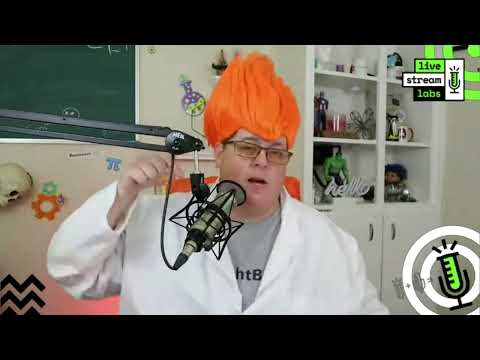
A live streaming XLR microphone earns its desk space by making your voice easy to hear, not by disappearing from the camera frame. That is why I have kept the Heil PR 40 close to my face on a scissor arm for roughly four and a half years. It is not an invisible-microphone setup, and I do not pretend it is. The arm is visible during a live stream. But it keeps the microphone where it needs to be, and that close placement has consistently given me the sound I want.
I care more about good audio than a perfectly clean shot. Good video is great, but I think viewers can get away with less-than-perfect video more easily than they can get away with bad sound. The PR 40 bundle is built around that priority: an XLR microphone held close on an arm, with a shock mount to support a practical broadcast-style position.
The Heil PR 40 is a strong pick for live streamers, podcasters, and webinar hosts who will keep a microphone close to their face. I have used it for roughly four and a half years, including travel, and it has delivered the focused broadcast-style sound I want. Just accept the visible boom arm and learn to speak down into the mic.
As an Amazon Associate I earn from qualifying purchases.
| Best for | Close-mic live streams, podcasts, and webinars |
|---|---|
| Connection | XLR |
| Pickup style | Dynamic cardioid |
| Included bundle | PRSM shock mount, broadcast arm, and cable |
| My use | Roughly 4.5 years, including travel |
| Placement | Close and above the mouth; speak downward |
The Heil Sound PR 40 bundle includes the dynamic cardioid XLR microphone, a PRSM shock mount, a two-section broadcast arm, and a microphone cable. For live streams, podcasts, interviews, and webinars, the practical story is simple. Keep the mic close, aim it the way it wants to be aimed, and let it concentrate on your speaking voice instead of asking it to capture the entire room.
Why this live streaming XLR microphone has stayed in my setup
I have traveled with this microphone to St. Louis, San Diego, Maine, Paris twice, and around Texas. That is a lot of time to find out whether a microphone is merely exciting when it is new or actually useful when it becomes part of the normal routine. I am almost five years into using it—roughly four and a half years—and it has been an amazing microphone for me over that stretch.
Travel alone does not tell you everything about a microphone, and I am not making a separate durability claim about every part of the bundle. What it does tell me is that the PR 40 has been part of my real working setup in more than one location. It has not been a microphone I used for one short experiment and then put aside. I have returned to it for live streams, interviews, and webinars because the close-mic approach works for how I talk on camera.
My priority is pretty blunt: I want good audio. If the boom arm is in the shot, fine. Some people think a microphone in front of your face looks unprofessional. I would rather have a visible arm and clear, close audio than move the microphone out of the way and make the stream sound worse. The arm is not decoration in my setup. It is what allows me to keep the PR 40 in a consistent place without using up the desk in front of me.
That is the central trade-off. This is a broadcast-style setup, not a tiny desktop microphone placed at the far side of the desk. If a clean, arm-free camera frame is your first priority, the PR 40 approach may not suit you. If intelligible, focused voice audio is first, I think the visible hardware is an easy compromise.
The PR 40 works best as a close-mic setup
Close placement is not an optional detail with this microphone. It is the point. I moved the arm roughly two to three feet away while continuing to talk at the same level. My voice was no longer coming through well. When I brought the PR 40 back close, it returned to the vocal level I wanted.
That is useful buyer information rather than something to work around. A microphone cannot be both placed well away from the speaker and expected to give the same close, focused voice result. In my use, the PR 40 rewards being near it. If you sit in a consistent position for a stream, interview, or webinar, that is manageable: put it in place before you begin and let the arm hold it there.
On the other hand, this is not the easiest format for someone who regularly leans far back, turns away from the desk, walks around, or expects the microphone to catch every word from several feet away. I would not buy this particular setup with that expectation. The distance check made the limitation clear in my own setup: moving it away reduced my voice pickup substantially.
There is also an orientation detail that matters. I get the best result speaking downward into the PR 40 rather than speaking straight across its end. I position it above and near me so that my voice naturally goes down into it. That placement works with the way I sit and speak during a live stream. Before changing settings or questioning the microphone, take the time to establish a close position that lets you address it from above.
This is one reason the scissor arm belongs in the bundle discussion. It gives me reach and adjustability to bring the microphone near my mouth, then keep it there. A faraway desk stand might make the camera look cleaner, but it would defeat the exact placement that has made this microphone work for me.


My experience with room noise and nearby MacBook speakers
This is the reason I like a close-positioned XLR setup for spoken live content. I work in an office complex, where I can hear activity outside the room. In my experience, that activity was not coming through my microphone in a way that became a problem for the audience. I could hear it, but the people listening to me were not hearing it through the PR 40 the way I was hearing it in the room.
I have also used the PR 40 for probably 200 interviews and webinars, if not more, while other people were talking through my nearby MacBook speakers. I did not wear headphones for those conversations. The speakers were right next to me, yet the people on the other end were not heard back through my microphone.
That has been hugely practical for my workflow. It means I have been able to have those calls and interviews without treating headphones as mandatory for every session. More importantly, it reinforces why I am willing to leave the microphone close and visible: its placement keeps the attention on my voice in the setup I actually use.
I would still keep that observation in context. I am describing my room, speaker placement, speaking position, and use—not promising the same result in every room at every speaker volume. I did not measure noise rejection, test a range of interfaces or gain settings, or compare every possible streaming microphone under matched conditions. Your layout and levels still matter. But my experience with ordinary office-complex activity and nearby MacBook audio is a meaningful reason I have stayed with the PR 40.
The broader lesson is simple: moving a microphone away just to hide it from the camera can hurt the very thing viewers need most. With the PR 40, I would prioritize getting the microphone close and correctly aimed first. Then I would frame the shot around that reality rather than compromise the audio for an empty-looking desk.
What the shock mount, arm, and pop filter add
The microphone in my setup sits in a shock mount with elastic-style bands. The purpose is straightforward: it is intended to reduce noise from bumping the microphone, knocking the desk, or shifting things around. That matters in a desk-mounted live-stream setup because incidental contact happens. If the microphone is suspended instead of rigidly coupled to every movement around it, the setup is designed to help limit those unwanted noises.
I would not treat a shock mount as permission to be careless around a microphone. It is part of making a desk setup more forgiving, not a replacement for keeping the arm and desk stable. Still, it is a useful inclusion for the kind of close, on-camera position I use. The mount and the arm work together: the arm gets the mic near me, while the shock-mounted arrangement is intended to help with the inevitable small bumps around a working desk.
The scissor arm is equally important because it lets me bring the microphone close without giving up desk space. It also gives me a natural way to set the PR 40 above my mouth and speak downward into it. That is more useful to me than simply having an arm with a large range of motion. The value is repeatability: once I have the right position, I can return to it for the next live stream or call.
There is one small annoyance. The arm squeaked when I moved it during my demonstration. It is not a deal-breaker, and it is not an issue when the arm stays put, but it is a real reason to avoid repositioning it in the middle of a sentence when possible. Set your angle and distance before going live, rather than swinging the arm around while speaking.
I also use a metal pop filter in front of the microphone to help with plosive sounds. My honest take is mixed: sometimes I think it helps, and sometimes I am not convinced it changes much. I would not choose this bundle because of the pop filter alone or assume it solves every plosive issue. Close placement and speaking direction have mattered more in my use.
+ Pros
- Strong close-mic vocal sound for live streams, interviews, and webinars
- Used successfully over roughly four and a half years and frequent travel
- In my setup, nearby room activity and MacBook speaker audio were not picked up through the mic
- Shock-mounted boom setup keeps the microphone close and helps limit bump noise
- Focused pickup rewards a practical broadcast-style placement
− Cons
- The included scissor arm squeaked when moved
- You need to stay fairly close for the intended vocal level
- The boom arm remains visible in a typical close-mic streaming setup
Who should choose the Heil PR 40 bundle?
I would choose this setup if you are a live streamer, podcaster, or webinar host who wants a microphone kept close to your face and does not mind seeing a boom arm in the frame. It makes particular sense if you are seated at a desk and can maintain a fairly consistent speaking position. That is the environment where the arm, close distance, and downward speaking angle all work together.
I also think it is a sensible fit for someone who works around ordinary room activity or uses a nearby computer during calls. In my own workflow, it kept my focus on speaking rather than worrying that every sound I could hear around me would become part of the stream. The MacBook-speaker experience is especially relevant for interview and webinar users who prefer not to wear headphones for every conversation.
It is less suitable if you absolutely need the microphone several feet away, if you move constantly while presenting, or if an arm in front of you is a nonstarter visually. Those are not minor preferences with this product. The close placement is foundational to the result I get, and the arm is foundational to keeping that close placement practical.
It is also worth separating the PR 40 from a generic “XLR is automatically better” decision. The microphone uses XLR connectivity, but I did not cover a particular interface, preamp, recorder, or gain setting in this review. The relevant takeaway is that my PR 40 setup has worked well when it is close and positioned properly. Before buying, make sure your broader audio setup can accept an XLR microphone and that you are comfortable building around that connection.
Bundle details and setup expectations
The manufacturer listing describes the PR 40 as a dynamic cardioid studio microphone with XLR connectivity, a steel housing, a large dynamic element, and an internal Sorbothane shock mount. It also says the microphone is assembled in the USA. The listed bundle includes the PRSM shock mount, two-section broadcast arm, and microphone cable.
Those listing details explain the product category, but they should not distract from the more useful day-to-day decision: will you use it as a close microphone? In my experience, that decision determines whether this style of setup makes sense. The PR 40 is not a microphone I would place far across the desk and hope to forget about. I would put it near my face, set it above me, speak down into it, and leave it there for the session.
Plan for compatible XLR input gear before ordering. Because this is an XLR microphone, your wider setup needs an appropriate XLR connection, such as an audio interface, mixer, or another suitable input solution. I did not test or recommend a particular companion device here, and I cannot tell you what settings your room will need. Compatibility is simply something to confirm before you commit to an XLR-based streaming chain.
Also keep your expectations realistic about what I did and did not assess over the long term. I have used and traveled with the microphone for roughly four and a half years, but I did not specifically assess cable durability, shock-mount durability, or condition after every trip. I also did not produce measured frequency-response, plosive-reduction, or noise-rejection results. My recommendation rests on the repeated practical result I have had: close, focused audio in the streaming and interview setup I use.
Specs
| Spec | Detail |
|---|---|
| Microphone type | Dynamic cardioid studio microphone |
| Connectivity | XLR |
| Housing | Steel, according to the manufacturer listing |
| Internal isolation | Sorbothane shock mount, according to the manufacturer listing |
| Bundle components | PRSM shock mount, two-section broadcast arm, microphone cable |
| Assembly | Assembled in the USA, according to the manufacturer listing |
Scorecard
Delivers the vocal level I want when kept near my face.
Handled nearby office activity and MacBook speaker audio well for me.
The arm makes consistent close placement easy.
It works best close and aimed downward, not across the room.
Useful shock mount and arm, though the arm squeaked when moved.
Heil PR 40 live streaming questions
Is the Heil PR 40 good for live streaming?
Yes, especially if you will use it as a close microphone on a boom arm. That has been my setup for roughly four and a half years, and it delivers the focused vocal level I want for live streams. It is a better fit for a seated host who can keep a consistent position than for someone who needs to speak from across the room.
How close should the Heil PR 40 be?
Keep it fairly close to your mouth. When I moved it roughly two to three feet away while speaking at the same level, I was no longer heard well. Bringing it back close restored the level I wanted. For me, that is the defining setup requirement rather than a small adjustment.
What direction should I speak into the PR 40?
I get the best result speaking downward into it rather than straight across its end. I place it above and near me so that this direction happens naturally while I am seated. That is why the arm is useful: it helps maintain that orientation without putting the microphone on the desk.
Can I use the PR 40 near computer speakers?
In my setup, I used it through many interviews and webinars while interview audio played from nearby MacBook speakers, without that speaker audio coming back through my microphone. Your room layout, speaker volume, placement, and audio chain can affect the result, so I would regard this as my practical experience rather than a guarantee for every setup.
What comes with this PR 40 bundle?
The listing says this bundle includes the PR 40 microphone, PRSM shock mount, two-section broadcast arm, and microphone cable. The listing also describes the microphone as a dynamic cardioid XLR studio microphone.
Do I need extra gear for the PR 40?
You need compatible XLR input gear because this is an XLR microphone. I did not cover a specific interface, mixer, preamp, or gain setting, so confirm that your existing audio gear supports the connection before buying.
Final take on this live streaming XLR microphone
The Heil PR 40 has earned its place in my live-streaming setup by doing the unglamorous thing consistently well: keeping my voice clear when it is close to me. It has traveled with me, worked through a large number of interviews and webinars, and let me use a desk-based setup without obsessing over every bit of sound around the room.
The buying decision is clear. Do not choose it because you hope it will vanish from your frame or work like a faraway room microphone. Choose it if you value close, focused audio enough to accept a visible arm, keep the microphone near you, and speak down into it. For that kind of live-streaming workflow, it has been a very solid long-term choice for me.
As an Amazon Associate I earn from qualifying purchases.