Mini Body Camera Review: Tiny Kit, Big Mounting Flexibility
This tiny wearable camera stands out for its surprisingly complete mount kit, live-view screen, and simple button recording—if you bring your own SD card.
Affiliate disclosure: As an Amazon Associate I earn from qualifying purchases. This article may contain affiliate links, which means I may earn a commission at no extra cost to you.
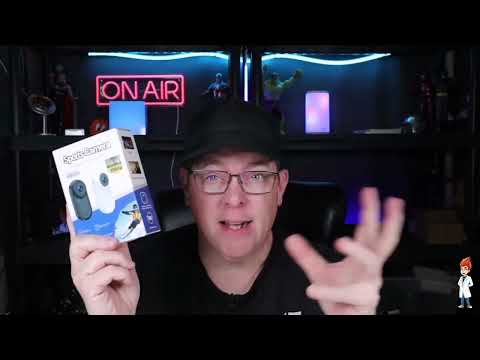
The Mini 1080P Body Camera gets the most important part of the mini body camera idea right: it is genuinely tiny. I expected a small sports camera, but I did not expect the camera itself to be such a little piece of hardware. More importantly, it arrives as a compact camera surrounded by a surprisingly substantial collection of holders, clips, and mounting parts. If you want a hands-free angle for casual vlogging, travel, cycling, or on-the-go clips, the range of placement choices is the main reason to look at this kit.
This is not a review built around finished-footage benchmarks. My first use focused on what arrived in the box, how the camera fit into the supplied accessories, its screen and card slot, and how recording starts and stops. Based on that hands-on setup, its strengths are clear: very small size, an unusually broad mount kit, live framing help, and simple controls. Its unanswered questions are just as important for buyers with higher-stakes recording needs, including battery runtime, stabilization, audio, low-light behavior, and actual recorded-video quality.
A smart pick for hands-free recording when mounting flexibility matters more than proven image quality. The camera is genuinely tiny, simple to start recording with, and comes with far more attachment options than I expected—but you will need to supply an SD card.
As an Amazon Associate I earn from qualifying purchases.
Why this mini body camera stands out: placement
The camera body is only one part of this package. Once I opened the box, the amount of included mounting hardware was the first surprise. There is a small holder or case that the camera fits into, additional connection pieces, and attachments designed to give the camera a useful position rather than leaving it as a tiny object with nowhere to go.
That distinction matters. A small camera is not automatically convenient just because it takes up little space. For hands-free recording, the useful question is where it can sit, how quickly it can be moved, and whether the angle makes sense for the activity. This kit gives you several starting points instead of making you buy into one fixed mounting style.
I handled the holder and assembled it with the watch-style wrist strap. The resulting setup puts the camera on your arm, where you can turn the camera toward the direction you need. That is an appealing option when holding a phone would be distracting or impractical. For a walking clip, a ride, or a quick point-of-view perspective, it is a more purposeful arrangement than simply carrying a camera in one hand.
The wrist configuration is also a reminder to choose the perspective before choosing the accessory. A wrist angle follows arm movement, which may be exactly the point if you want to show what your hands are doing. It will not necessarily be the best position for every ride or every vlog. The value here is that the kit gives you another choice rather than assuming one camera position suits every job.
There is a bike-oriented mount among the accessories as well. If the goal is bicycle or motorcycle footage, that mount may be a cleaner starting point than the wrist strap, depending on the perspective you want. I like that both options are included: one is wearable and one is intended for the bike. It makes this feel like a compact camera kit with several possible uses, not just a camera with a single novelty attachment.
The accessory I would be most inclined to use for casual hands-free clips is the magnetic necklace-style mount. The magnetic piece is worn around the neck, with the small camera placed on the outside. That gives you a simple chest-level point of view for walking, traveling, showing a task, or recording a casual vlog without a large harness. It is a straightforward concept, but one that makes a lot of sense for a camera this small.
There are also tripod-compatible attachment options. That matters because it lets the camera move beyond wearable use. A tiny camera can still be useful on a small tripod or another supported holder when you want a stationary angle. The package does not turn this into a full-size production camera, but it does let the camera fit into more than one kind of setup.
| Camera type | Compact wearable body camera |
|---|---|
| Recording media | Removable SD card required |
| Live preview | Small built-in screen |
| Mounting options | Wrist, bike, tripod-compatible, magnetic necklace |
| File transfer | Cable or removable SD card |
Mount choice matters more than camera size alone
For this Mini 1080P Body Camera, I would begin a buying decision with the mount you expect to use most. The camera is small enough that portability is not the difficult part. Selecting the right place to put it is what determines whether it fits your recording routine.
For travel, the necklace option seems especially well matched to short walk-and-talk clips or a simple first-person perspective while moving around. It keeps the setup compact and avoids the need to hold a device. For a bicycle or motorcycle, the bike-oriented accessory is the more natural place to begin. For a hands-focused activity, the wrist setup gives a different view and allows the camera to be aimed as needed.
The tripod-compatible pieces add another practical decision. If your use is partly wearable and partly stationary, the included connection options mean you are not limited to one style of recording. A single tiny camera can be moved between a wearable mount and a tripod-compatible arrangement instead of requiring a separate camera for each angle.
I would not assume that every mount is interchangeable for every activity. The best choice depends on comfort, the perspective you want, and how secure the camera feels in your particular use. I did not test long-term mount security, durability, or performance during an active ride, so I cannot say how each option will hold up under sustained movement. Before using any small camera for an important trip or ride, I would make a short test recording with the exact mount and placement I planned to use.
That is not a knock on this kit. It is simply the sensible way to approach wearable cameras. A chest-level clip, a wrist view, and a bike-mounted view will all produce very different footage. The broad selection of accessories is a real advantage because it gives you those choices; it also means you should spend a little time deciding which one suits the job.

My setup experience: screen, SD card, and recording
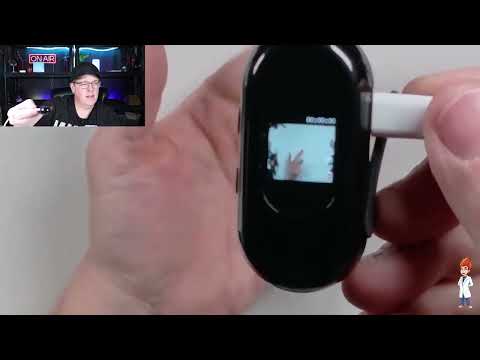
The initial setup was direct. When I first tried to turn the camera on, it was not charged. I plugged it in and powered it on that way so I could look through the interface. For a first outing, I would charge it before leaving home rather than plan on using it while tethered to a cable.
Once powered on, the small built-in screen displayed a live view. I could see my hand in that preview immediately. The screen is necessarily small because the camera itself is so small, but it serves a useful purpose: it lets you check what the lens is seeing instead of mounting the camera completely blind.
That framing check is particularly relevant with a wearable camera. A necklace mount, wrist strap, or bike mount can all shift the view compared with what you expect. The screen will not replace a large monitor, and I would not describe it as a detailed editing display. But for confirming basic aim before recording, it is a welcome feature on such a compact device.
Recording requires an SD card. I inserted a card into the side-mounted slot, then used the button labeled OK. Holding that button for a few seconds started recording, and pressing it again stopped recording. In my initial use, it was that simple. There was no phone pairing or app workflow involved in the setup I used.
That button-first approach is one of the better fits for this type of camera. When you are choosing a small wearable device, you often want it because you do not want to stop and manage a phone. The straightforward control scheme keeps the process focused on placing the camera, checking the small preview, and starting the clip.
When you are finished, recorded videos can be transferred to a computer using the included cord, or you can remove the SD card to move files that way. Both are familiar options. If you prefer direct file handling instead of relying on another companion app, this setup has a practical appeal.
One important planning detail is that an SD card is not included. Since the camera needs a card to record, it is not fully ready to capture video immediately out of the box unless you already have one available. I would make sure you have the card before the camera arrives, then charge the unit and do a short setup check before any outing where you want to record.
What the 1080P label does—and does not—tell me
The product is positioned as a 1080P camera. I did not measure the recording resolution or evaluate finished footage, so I treat 1080P as a listed specification, not as a firsthand judgment about picture quality. Resolution alone cannot answer the questions that matter most once you start moving: how the footage looks in motion, how wide the field of view is, whether audio is usable, how the camera behaves in dim conditions, or whether stabilization is present and effective.
Those unknowns do not erase what I did observe. I saw a compact camera with a working live preview, a side card slot, straightforward record controls, and a versatile group of mounting accessories. They do mean I would keep the purchase decision focused on those confirmed strengths rather than treating it as a fully proven replacement for a larger action camera.
If your recording is casual, the trade-off may be reasonable. A small hands-free camera that is easy to place and easy to start can be more useful than a larger camera that stays in a bag. If you need dependable footage for a once-only event, a demanding ride, professional work, or a trip where reshooting is impossible, I would want answers on image quality, battery life, mount security, and low-light performance before making it my only camera.
The same caution applies to the word “sports” in the general product positioning. The available setup showed the camera and its mounting options, but I did not test it through sport use, weather exposure, impacts, or long recording sessions. Buy it for its compact wearable concept and mount flexibility, not on assumptions about those untested conditions.
+ Pros
- Genuinely tiny wearable camera body
- Unusually broad selection of included mounts and attachment pieces
- Wrist, bike, tripod-compatible, and magnetic necklace mounting options
- Small built-in screen provides a live preview
- Simple button-controlled recording after installing an SD card
− Cons
- Camera was not charged when first powered on
Who this wearable camera fits best
This is a strong match for someone who values options over a large camera body. The camera is especially compelling if you have a clear use for one or more of the included mounts and prefer a direct, card-based recording workflow.
- Hands-free vloggers: The magnetic necklace mount and wrist configuration provide simple wearable perspectives without requiring you to hold a phone.
- Cyclists and motorcyclists: The kit includes a bike-oriented mount, while the wrist setup offers another possible point of view.
- Travelers: The camera itself is extremely compact, and the assortment of attachments supports different shooting approaches without building a large rig.
- Users who prefer basic controls: After inserting an SD card, I could start and stop recording with the labeled OK button rather than deal with an app in my initial setup.
- People who need a secondary angle: The tripod-compatible attachment options make this more flexible than a wearable-only camera concept.
I would be more cautious if your priority is verified image quality. I did not evaluate video output, audio, stabilization, battery runtime, or low-light performance. I also do not know the supported SD-card capacities or formats, charging time, water resistance, field of view, or the computer connection type. Those details may matter more than the mount kit depending on how you plan to use the camera.
Buyer checklist before your first recording
First, have an SD card ready. The side-mounted slot is where the card goes, and recording did not begin until I installed one. Because a card is not included, this is the one required extra item to plan for rather than discovering it when you are ready to shoot.
Second, charge the camera ahead of time. My unit was not charged when I first powered it on, though I was able to turn it on while it was plugged in. Charging before your first use is the simplest way to avoid setting up a new camera only to find that you need to stay near a cable.
Third, pick the mount based on the shot. The magnetic necklace option makes sense for a casual chest-level walking or vlogging view. The bike-oriented piece is more logical for bike use. The wrist strap works when an arm-mounted angle is what you want, and the tripod-compatible parts are useful for a more stationary setup. Taking a moment to check the live preview can help confirm that the frame matches the placement.
Finally, make a short test clip and transfer it using the method you expect to use later. The camera supports transfer through the included cord or by removing the SD card. A quick check before travel or an outing can confirm that your computer workflow is comfortable and that the mount gives you the perspective you intended.
Specs
| Spec | Detail |
|---|---|
| Listed resolution | 1080P (manufacturer/listing claim) |
| Storage | Side-mounted SD-card slot |
| Display | Small built-in live-view screen |
| Recording control | Hold labeled OK button to start; press again to stop |
| Included mounting | Wrist/watch strap, bike mount, tripod-compatible attachments, magnetic necklace mount |
| File transfer | Included cord or removable SD card |
How I scored the Mini 1080P Body Camera
My score is driven mainly by the things I handled and used: the exceptionally small body, the number of included attachment choices, the live-view screen, and the simple record control. The camera earns its best marks for portability and mounting flexibility. It loses some out-of-box readiness because it needs an SD card and my unit needed charging before first use.
I kept the framing-help score more moderate because the screen is useful but very small. It is enough for a quick live check, not a large viewfinder experience. I also did not score picture quality as a finished-footage category because I did not evaluate it. That omission is intentional: a fair score should reflect the parts of the product I actually used, rather than fill in the blanks with listing assumptions.
Scorecard
The camera body is exceptionally small.
The included wrist, bike, tripod, and necklace options cover several use cases.
Recording controls were simple after installing an SD card.
The live screen is useful, though very small.
Plan to supply an SD card and charge the camera first.
Mini body camera FAQ
Does the Mini 1080P Body Camera include an SD card?
No. An SD card is not included, and you need to install one before the camera can record. Plan for that extra item before your first use.
Can I record without using a phone app?
Yes, in my setup I inserted an SD card and used the labeled OK button to start and stop recording. I did not use a phone app. Videos can be moved to a computer with the included cord or by removing the SD card.
What mounting options come with this mini body camera?
The package includes multiple mounting and attachment pieces. I identified a wrist/watch-strap configuration, a bike-oriented mount, tripod-compatible attachment options, and a magnetic necklace-style mount.
Does the camera have a screen for checking the view?
Yes. It has a small built-in screen, and I saw a live view on it after powering the camera on. The compact screen is useful for a basic aiming check before recording.
Is the 1080P video quality verified?
1080P is a manufacturer or listing claim. I did not evaluate finished video quality, audio, stabilization, low-light performance, field of view, or battery runtime, so I cannot make a performance claim about those areas.
Is this camera ready to use as soon as it arrives?
Not completely. You need to provide an SD card for recording. My unit also was not charged when I first turned it on, so charging it before heading out is a sensible first step.
Final recommendation
The Mini 1080P Body Camera makes sense when your priority is a very small hands-free camera with several ways to position it. I liked the contrast between the little camera body and the extensive accessory kit. The wrist strap, bike-oriented mount, tripod-compatible pieces, and magnetic necklace mount give the package meaningful flexibility, while the live screen helps with basic framing and the OK button made recording easy to start and stop after I added an SD card.
Just set expectations correctly. This is a compact placement-focused recording kit, not a fully evaluated substitute for a larger action camera. Bring your own SD card, charge it before your first outing, choose the mount for the specific angle you need, and do not treat the listed 1080P resolution as proof of finished-footage performance. If the included mounting choices line up with how you shoot, it is a practical little package.
As an Amazon Associate I earn from qualifying purchases.