Small Action Camera for Vlogging: Is Xtra Edge Worth It?
The Xtra Edge Action Camera is genuinely tiny, quick to mount, and easier to frame than most mini cameras thanks to front and rear screens. Just bring a microSD card and plan around its mount-first design.
Affiliate disclosure: As an Amazon Associate I earn from qualifying purchases. This article may contain affiliate links, which means I may earn a commission at no extra cost to you.
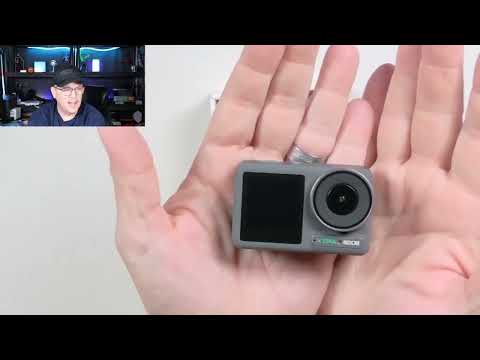
If you are looking for a small action camera for vlogging, the Xtra Edge immediately makes its case with size. When I took it out of the box, it was much smaller than I expected and felt exceptionally lightweight in my hand. That matters for a camera intended to live on a helmet, move between mounts, or stay unobtrusive in a compact creator kit. Its other standout feature is the two-screen layout: there is a monitor on the front for selfie-style framing and another on the rear for forward-facing use.
This is not a finished image-quality review. I did not have a microSD card installed during my hands-on setup, so I could not record or review photo or video clips. What I could assess directly was the physical design, included hardware, magnetic mounting system, screen behavior, and menu options. Those observations point to a camera designed around quick action mounting and flexible framing rather than a conventional tripod-first workflow.
Is the Xtra Edge a good small action camera for vlogging?
I think it is a sensible fit for someone who wants a camera that stays out of the way. The Xtra Edge is built around a very compact body and a magnetic mounting system, not a larger camera covered in standard mounting points. In practical terms, that makes the most sense for helmet-mounted activities, quick action shots, and short selfie-style clips where carrying a larger camera would defeat the purpose.
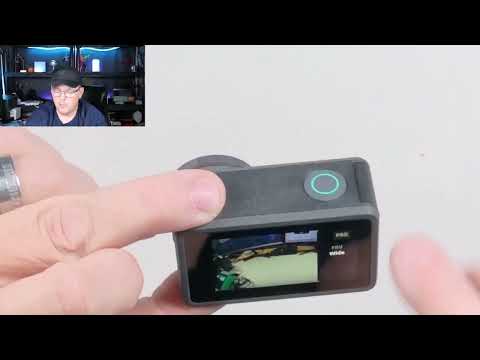
The dual displays are the key vlogging advantage. I initially noticed what looked like a front camera, but after checking the camera I found that the front is a monitor, not a second camera. Both screens show the view from the same camera. When the lens faces me, the front display gives me a way to frame myself without guessing. When the camera faces outward, the rear display is the natural screen to use. I could also access controls from either the front or rear display.
That flexibility is more useful than it may sound on a camera this small. Mini action cameras can be easy to carry but frustrating to frame when they offer only a rear screen or no live display at all. Here, I can switch between an outward-looking action angle and a selfie angle without changing the basic camera setup. For a vlogger who wants a small secondary camera for quick angles, that is a genuinely practical design choice.
The trade-off is equally clear: the Xtra Edge is not ready to screw directly onto a standard tripod. I found no built-in tripod thread on the camera or on the included mounting setup. A compatible adapter or mount can bridge the magnetic connection to a tripod, but that is an extra piece to plan for. If your everyday workflow is a desk-mounted talking-head video, factor that in before buying.
What came in the box and how the mount system works
I unpacked the camera, a protective outer case, a rounded adhesive-style mount, a mount/connector assembly, a removable battery, a rubber protective sleeve, a USB-C-to-USB-C cable, and a quick-start guide. There were also a few small pieces whose purpose was not immediately clear while I was unpacking everything. The important takeaway is that the box is not just the camera by itself; it includes the core hardware for its intended mount-driven use.
The mount system was the part that clicked for me fastest. The camera connected to the included mount magnetically, and I found that connection quick and easy to use. Rather than having to fight a small cage or fumble with a latch, I could clip the camera into place quickly. For an action camera, that is a meaningful convenience. A camera that is small enough to carry everywhere loses some of its appeal if it takes too long to attach when I want a quick shot.
The rounded adhesive-style mount is designed for a curved surface. I identified it as a useful helmet-oriented option for activities such as skiing or skateboarding. The included case and connector pieces work with that overall concept: secure the mounting hardware where it belongs, then attach the compact camera assembly. It is a focused approach, and it fits the product better than pretending this is a general-purpose tabletop camera first.
I also tried the rubber sleeve. It appeared to add a little extra protection if the camera were dropped, but I did not find that it added a new control or mounting function. That is worth knowing when sorting through the included pieces: it is protective hardware, not a solution for tripod mounting or a change to the camera’s basic usability.
For more camera options and mounting-oriented coverage, browse the Live Stream Labs action camera guides. The Xtra Edge’s particular appeal is its tiny form factor and magnetic quick-mount approach, so it is best compared with other compact action-focused cameras rather than larger vlogging cameras with a standard tripod thread.
Battery, storage, and the setup detail not to overlook
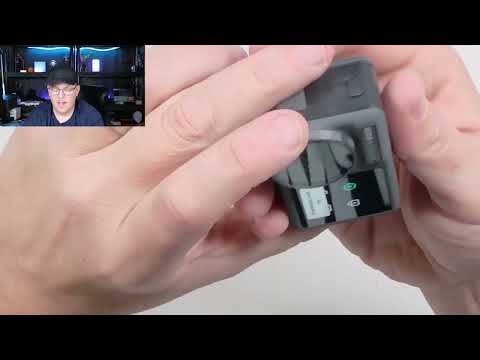
The Xtra Edge uses a removable battery. I inserted it into a dedicated battery bay, and the battery has a small pull tab to make removal easier. That is a small physical detail, but it is welcome on such a compact device, where tiny batteries can otherwise be awkward to remove. The camera also has a USB-C connection port and a microSD-card slot.
The microSD card is not optional if you plan to shoot with it. I did not have one installed during my setup, and the camera indicated that no card was present. As a result, I could navigate the interface and look through the recording options, but I could not capture or review actual photos or video. Anyone considering this camera should add a card to the buying plan from the start rather than expecting the camera to be ready to record without one.
That limitation also shapes what I can responsibly say about the Xtra Edge. I am not making a claim about final image quality, stabilization, audio quality, low-light results, battery runtime, charging time, storage compatibility, or real-world water resistance. I also did not test which resolution settings work with which frame rates. The menus offer useful options, but menu availability is different from evaluating the recorded result.
Dual screens and orientation lock make framing easier
The front-and-rear monitor arrangement is the feature that most separates the Xtra Edge from a bare-bones mini camera. A small camera can be ideal for an unusual angle, but it is much more useful when I can see whether the composition is right. With the Xtra Edge pointed away from me, I can monitor the forward-facing view on the rear display. With the lens turned toward me, I can use the front monitor for a selfie-style composition.
I could work through controls from either side as well. That makes the two screens more than a novelty. Depending on how the camera is mounted, one side may be easier to reach than the other, and having access from both sides avoids forcing a single orientation just to change a setting.
The orientation-lock setting worked as expected during my setup. With orientation lock off, the display changed as I turned the camera. Once I enabled the lock, the display stopped rotating. For vertical or horizontal shooting, that can help keep the interface where I want it rather than having it rotate at an inconvenient moment. It is especially relevant for a tiny camera that might be placed on a helmet or angled in a less conventional position.
I also saw settings for display brightness, the front screen, and voice activation. I did not conduct a real-world voice-activation recording test, so I cannot assess how reliably that function responds in use. Still, the presence of those controls gives the camera more setup flexibility than its very small body initially suggests.
Capture modes and resolution options I found in the menu
After powering the camera on, I navigated through photo, time-lapse, slow-motion, pre-record, and loop-recording modes. These are useful options for the type of action-oriented shooting this camera is built for. Time-lapse and slow motion give a small camera more creative range, while pre-record and loop recording are relevant when I want the camera rolling around an activity instead of manually managing every moment.
I also saw 1080p, 2.7K, and 4K options in the resolution menu, plus a 120 fps setting. That is a solid set of choices to have available in a camera this compact. I would not assume every listed resolution pairs with every frame-rate option, though, because I did not record clips to map out the combinations or evaluate the results. If a particular setting is essential to your purchase, verify that pairing before making the camera your primary tool.
The menu included a wide/underwater-related setting that visibly changed the framing on screen. Switching it changed how much of the scene appeared in the displayed view. I did not use the camera underwater, so I cannot speak to underwater performance or water resistance. The useful firsthand observation is simply that the setting altered the on-screen framing.
Storage deserves attention here, too. Higher-resolution and higher-frame-rate capture can use substantial memory, particularly if I choose the highest available settings. The Xtra Edge is small, but the storage needs of 4K or high-frame-rate recording are not. A buyer who wants long action sessions should plan card capacity accordingly and remember that I did not test card compatibility or real recording duration.
The tripod limitation is the main buying decision
The lack of a built-in standard tripod thread is the biggest practical limitation I found. Neither the camera body nor the included mounting setup offered a direct standard tripod connection. For a helmet mount, that is not a problem; the supplied curved adhesive-style hardware aligns well with the camera’s action-first purpose. For a creator who expects to put the camera on a small tripod every day, it creates an extra step.
Tripod use is still possible with the right compatible accessory. The camera’s magnetic connector means I can use a mount or adapter that accepts that connection and then attaches to a tripod. I did not verify compatibility with specific third-party products, so I would check the connection style carefully rather than assuming any random action-camera adapter will work.
This is why I see the Xtra Edge as mount-first rather than tripod-first. It is strongest when the priorities are tiny size, fast attachment, helmet-oriented placement, and a quick selfie monitor. It is less natural as a permanent desktop camera. That distinction should make the purchase decision straightforward: buy it for compact action and flexible mounting, or choose a different design if direct tripod use is non-negotiable.
Who should consider the Xtra Edge Action Camera?
- Helmet-mount users: The curved adhesive-style mount and low-weight camera body suit helmet-oriented activities such as skiing and skateboarding.
- Vloggers who need selfie framing: The front monitor provides a much easier way to compose a shot than a mini camera with no forward-facing display.
- Creators who value fast mounting: The magnetic connection was quick and easy when I handled it.
- People building a compact kit: The Xtra Edge takes up very little space while still offering dual screens, removable power, and several visible capture modes.
- Users who need occasional action angles: The camera can make sense as a small specialty camera alongside a larger primary setup, provided you have a microSD card and the mounting hardware your workflow needs.
I would look elsewhere, or budget for a compatible adapter, if a direct standard tripod mount is essential. I would also wait for recorded samples and tested runtime information if the decision depends on image quality, audio, stabilization, low-light performance, underwater use, or battery life. Those are important camera-buying questions, but they were outside what I could assess without a microSD card installed.
The Xtra Edge is a compelling small action camera for vlogging if compact size, quick magnetic mounting, and selfie framing matter more than direct tripod mounting. I liked the tiny body and dual displays, but you need a microSD card and a separate compatible mount for tripod use.
As an Amazon Associate I earn from qualifying purchases.
| Best for | Helmet-mounted action shots and compact selfie-style vlogging |
|---|---|
| Mounting | Magnetic quick-mount system with curved adhesive-style mount |
| Displays | Front and rear monitors |
| Recording media | microSD card required |
| Power | Removable battery |
| Tripod use | Requires a compatible adapter or mount |
+ Pros
- Extremely compact and lightweight camera body
- Magnetic mount connected quickly and easily in my hands
- Front and rear displays help with both action and selfie framing
- Included hardware supports curved helmet-style mounting
- Several capture modes and resolution/frame-rate options are available in the menu
- Removable battery includes a helpful pull tab
- Orientation lock keeps the display from rotating when you want a fixed orientation
− Cons
- No standard tripod thread on the camera or included mounting setup
- Higher-quality and high-frame-rate recording settings can use substantial storage
Specs
| Spec | Detail |
|---|---|
| Product | Xtra Edge Action Camera |
| Video resolution options seen | 1080p, 2.7K, and 4K |
| Frame-rate option seen | 120 fps option in the menu |
| Capture modes seen | Photo, time-lapse, slow motion, pre-record, and loop recording |
| Displays | Front and rear monitors |
| Ports and storage | USB-C port and microSD-card slot |
| Battery | Removable battery |
| Mounting hardware | Magnetic connector and curved adhesive-style mount |
| Tripod thread | No standard tripod thread included |
| Other settings seen | Display brightness, voice activation, orientation lock, and wide/underwater-related framing setting |
Scorecard
Genuinely tiny and lightweight in hand.
The magnetic connection was fast and easy to use.
Front and rear monitors make framing more flexible.
A separate compatible adapter is needed.
Useful modes and multiple resolution options were visible in the menu.
As an Amazon Associate I earn from qualifying purchases.
Frequently asked questions
Does the Xtra Edge Action Camera record in 4K?
The menu I navigated included 4K options alongside 1080p and 2.7K. I did not record clips during setup, so I cannot judge final 4K image quality or confirm every available resolution and frame-rate pairing.
Does it have a front-facing camera?
It has a front-facing display rather than a second camera. The front and rear monitors show the view from the same camera, making it easier to frame selfie-style and forward-facing shots.
Can you mount the Xtra Edge on a tripod?
Not directly with a standard screw thread. I found no standard tripod thread on the camera or included mounting setup. A compatible adapter or mounting solution is needed for tripod use.
Does the Xtra Edge include a battery?
Yes. I unpacked a removable battery and inserted it into the dedicated battery compartment. It includes a pull tab to help with removal.
Do I need a microSD card?
Yes. The camera uses a microSD card to record photos and videos. I did not have one installed during my hands-on setup, so I could not capture footage for image-quality or performance evaluation.
What recording modes are available?
I saw photo, time-lapse, slow-motion, pre-record, and loop-recording modes in the camera menu. These are menu options I observed during setup; I did not record clips to evaluate their output.
Final recommendation
The Xtra Edge Action Camera gets the physical concept right for its intended user. It is genuinely tiny, lightweight, quick to connect to its magnetic mount, and more practical for self-framing than many mini cameras because it has displays on both the front and rear. The curved adhesive-style mount also gives it a clear place in a helmet-oriented action setup.
Buy it for that compact, mount-driven role. Bring a microSD card, plan a compatible tripod adapter if a tripod is part of your workflow, and treat the recording options as capabilities to investigate rather than a completed judgment on footage quality. For quick action angles and selfie-style shooting from a very small camera, the Xtra Edge has a thoughtful foundation.