Best Phone Stand for TikTok Live? Lamicall Review
The Lamicall adjustable desk stand solves a core vertical-streaming problem: holding a phone steady and hands-free. It was quick to set up, fit my cased phone, and left room to charge, though the height adjustment does not feel especially secure.
Affiliate disclosure: As an Amazon Associate I earn from qualifying purchases. This article may contain affiliate links, which means I may earn a commission at no extra cost to you.
A phone stand for TikTok Live does not need to be complicated to be useful. The Lamicall Cell Phone Stand gives me a place to put my phone upright, in portrait orientation, without having to hold it through an entire live. That directly addresses the problem with handheld vertical streaming: small hand movements become visible framing changes, and a longer live can quickly become uncomfortable. With this stand, I can keep the phone in front of me, keep both hands available, and concentrate on the live rather than on supporting the phone.
I found the Lamicall most useful as a straightforward desk accessory for TikTok Live, Instagram Live, Facebook Live, Reels, and other vertical phone recording. My cased phone fit in the cradle, the holder angle adjusted, and I could keep a charging cable connected while the phone was mounted. Those are meaningful details for a phone-first workflow. The important caveat is the height adjustment: it moves with a rear button, but it does not lock into place as positively as I would want from an adjustment I plan to change often.
I recommend it as a simple phone stand for TikTok Live and other vertical desk video if you want fast setup, case-friendly use, and charging access. Set the height before you begin, because the adjustment does not have a particularly confidence-inspiring lock.
As an Amazon Associate I earn from qualifying purchases.
| Best for | TikTok Live, Instagram Live, Reels, and desk recording |
|---|---|
| Phone position | Vertical portrait orientation supported |
| Setup | Tool-free push-together assembly |
| Charging access | Cable can stay connected while mounted |
| Case use | My cased phone fit successfully |
| Main caveat | Height adjustment has a weak lock feel |
Why the Lamicall works as a phone stand for TikTok Live
Vertical live streaming is a specific job. I do not need an elaborate camera rig just to talk to people from a desk, monitor the screen, and keep a phone in a sensible position. I need the phone to stay upright, remain easy to see, and leave my hands free. The Lamicall is aimed directly at that kind of setup. I can put the phone in the stand, open the live platform, frame myself, and use the screen without continuously gripping a device.
That is a better fit than holding the phone if the stream is stationary. When I hold a phone, every repositioning of my hand affects the shot. It can look bouncy, and I am also occupied with the simple task of keeping the phone where it needs to be. On this stand, the phone stays in one place while I run an Instagram, TikTok, or Facebook live in vertical format. I can interact with the screen, watch the live, and do other things without holding onto the phone.
The same logic applies to recording short-form video. For a TikTok, Reel, or another portrait clip, I can start recording and step back rather than trying to hold the phone at arm’s length. This is especially practical for a simple talking-to-camera clip or any recording where the phone can remain on a desk. It is not intended to replace a moving mount, an overhead rig, or a full-height floor stand. Its value is that it removes fuss from the basic desktop vertical-video setup.
I would place the stand closer to me than it appears in my setup. Moving a desk stand into a comfortable working distance makes it easier to see comments and use the phone screen naturally. The stand lets me choose a phone position that suits the desk and then keep that position while I focus on the actual live. For someone whose alternative is propping a phone against an object or holding it for the whole session, that is a clear quality-of-life upgrade.
My setup experience: quick assembly, case fit, and charging access
Setup was appropriately simple. There were no screws to install and no involved assembly process. I pushed the parts together and the stand was ready to use. That matters more than it may sound for a small desk accessory. A phone holder should not create a project before a live stream; this one gets to the useful part quickly.
I placed my phone in the cradle while it was still in its case, and it fit successfully. That is the real-world use I care about because removing a normal phone case every time I want to go live would be tedious. The areas where the phone rests also have rubber-like padding. I liked having that cushioning between the phone and the stand rather than having the phone sit directly against a hard contact surface.
The cradle moves back and forth to change the viewing angle. At a desk, that adjustment is useful for getting the screen pointed toward me instead of making me hunch over or tilt the entire stand. It gives me an easy way to tune the phone position for a seated live, a video call, hands-free viewing, or a vertical recording. I would use the tilt adjustment as part of normal setup, because the best screen angle depends on the height of the desk and where I am sitting.
Charging access is another practical advantage. I could route a cable to the phone while it was in the stand, so the phone could remain plugged in during use. That is particularly helpful for a live stream, where battery life is part of the setup rather than an afterthought. I do not have to choose between keeping the phone mounted and keeping it charged. For desk use, I can set the phone in place, connect the cable, and leave it there.
Taken together, the screw-free setup, cased-phone fit, padded contact area, adjustable cradle, and cable access make the Lamicall feel well matched to a routine desktop phone workflow. It is not trying to add apps, batteries, or complex controls. It simply holds the phone where I need it. That is exactly the point of a desk stand, and it is where this product has the most value.

The height adjustment is useful, but it is the Lamicall’s weak point
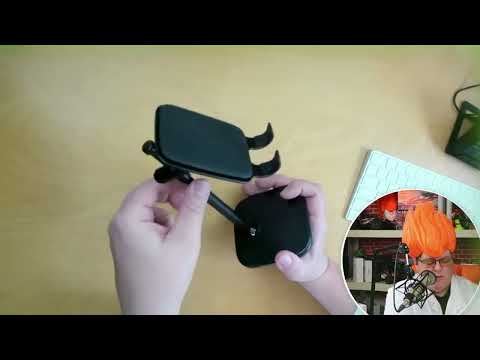
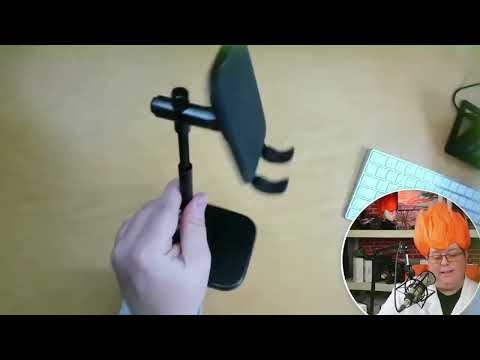
The stand has a button on the back for moving its height up and down. I appreciate having that option because even a small change in phone height can improve a desk shot. Raising the phone can help avoid an overly low camera angle, while lowering it can make the screen more comfortable to view from a seated position. Height adjustment gives this stand more flexibility than a fixed cradle.
However, this is the one part of the product I would approach with realistic expectations. The adjustment does not lock into place especially well. After I moved it and released the button, it held more firmly, but the height section could still move if it was not properly held in place. The mechanism feels more like a tension-held adjustment than a firm, positive lock that gives immediate confidence.
For a phone that is sitting on a desk and staying in one position, this may not be a deal-breaker. My practical approach would be to choose the height before starting the live, make sure it is holding as intended, and avoid repeatedly changing it midstream. The cradle-angle adjustment is more straightforward for fine-tuning the screen once the phone is in place. If you want a stand that you constantly raise, lower, and reposition, the weak lock feel is an important reason to consider another option.
This caveat also keeps the recommendation in perspective. I see the Lamicall as a convenient phone stand, not a heavy-duty studio support. It is best when the phone is positioned for a normal desk session and then left alone. Used that way, its useful features remain useful; I just would not buy it on the assumption that the height mechanism has a particularly robust locking action.
+ Pros
- Tool-free push-together setup
- Keeps a phone upright and hands-free for vertical live streams or recording
- Held my cased phone successfully
- Padded phone contact areas
- Charging cable can remain connected while the phone is mounted
- Tilt adjustment helps position the screen at a desk
− Cons
- Height-adjustment mechanism does not lock into place especially well
- Height section can still move if it is not properly held after adjustment
Who should choose this desk phone holder?
I would recommend the Lamicall to phone-first creators who work in portrait orientation at a desk. That includes people hosting TikTok Live, Instagram Live, or Facebook Live, as well as people recording TikToks, Instagram Reels, and similar vertical video. In those situations, the major benefit is easy to understand: the phone can remain upright in front of me while I use both hands and keep the image from bouncing around with every movement.
It also makes sense for ordinary hands-free desk use. If I want my phone visible while it charges, watch a stream, take a video call, or work with the phone nearby, this gives it a designated place. The product does not need a streaming-only purpose to be useful. Its basic role is holding a phone at a viewable angle, and it can do that whether I am live or simply using my desk.
I would not choose it as my primary answer for every filming situation. It is not the right product for overhead views, walking video, a high camera position away from a desk, or a more elaborate production rig. It is also important to separate my phone use from the manufacturer’s larger-device claims. Lamicall says the stand works with 4- to 10-inch smartphones and small tablets, with 8- to 10-inch devices recommended in landscape orientation. I used a cased phone, not a larger tablet, so a phone is the use case I can personally recommend here.
If your phone has a particularly bulky wallet case, ring holder, finger grip, or another large attachment on the back, check the fit carefully. Lamicall says it accommodates cases up to 0.71 inch thick and notes that bulky rear accessories may not fit securely. My normal cased phone fit, which is encouraging for standard case use, but it does not establish fit for every phone-and-accessory combination.
Desk-streaming details worth considering before buying
For a vertical live, framing is often less about expensive gear and more about putting the phone in a consistent, usable position. I would set the Lamicall at the desk where I normally sit, put the phone in portrait orientation, adjust the height and cradle angle, connect the charging cable if I expect a long session, and then use the phone hands-free. That sequence plays to the stand’s strengths: quick setup and a simple stationary position.
The product listing states that the height adjusts from 5.9 to 10.6 inches and that the angle adjusts up to 90 degrees. It also describes a weighted metal base, reinforced aluminum support rod, and anti-slip rubber feet. Those are manufacturer claims rather than measurements or material specifications I independently verified. They provide useful buying context, but my firsthand take is centered on the elements I used: the push-together setup, rear height button, adjustable cradle, padded phone resting area, cased-phone fit, vertical orientation, and charging access.
The distinction matters if stability with a larger device is your deciding issue. I did not test larger phones or small tablets, so I cannot say how this stand performs with those devices. Likewise, I did not establish long-term durability of the height-adjustment mechanism. What I can say is that the lock feel was the weak spot during my use with a phone. Buyers who want a simple desktop holder should weigh that concern against the convenience of the rest of the design.
For the core TikTok Live use case, the tradeoff is favorable. This product solves the immediate problem of trying to make vertical phone content while also holding the device. It keeps the setup uncomplicated and lets the phone stay connected to power. Just treat the adjustable height as a set-it-before-you-go feature rather than the kind of control you will want to work constantly during a stream.
Specs
| Spec | Detail |
|---|---|
| Product | Lamicall Cell Phone Stand DP03-EU-B, black |
| Height adjustment | 5.9 to 10.6 inches (manufacturer claim) |
| Angle adjustment | Up to 90 degrees (manufacturer claim) |
| Device compatibility | 4- to 10-inch smartphones and small tablets (manufacturer claim) |
| Large-device guidance | 8- to 10-inch devices recommended in landscape (manufacturer claim) |
| Case compatibility | Up to 0.71 inch / 18 mm thick (manufacturer claim) |
| Listed construction | Weighted metal base, reinforced aluminum rod, anti-slip rubber feet (manufacturer claim) |
| Phone contact areas | Rubber-like padding observed |
Is it better than holding a phone for a live stream?
For a stationary desk live, yes. Holding a phone offers mobility, but it also makes the framing dependent on my hands. The Lamicall exchanges that mobility for a steadier hands-free position. I can look at comments, interact with the phone, and carry on with the stream without the constant distraction of gripping the device or worrying about making the picture shake.
That does not mean a desk stand replaces all other mounting options. If I need to move around, capture a wide room view, make an overhead shot, or change camera height dramatically, I need a different tool. But for a straightforward vertical live where I am seated or working at a desk, a simple phone stand is often the more sensible option. It is fast to put into use and easy to leave ready for the next stream.
The best reason to buy this Lamicall is not that it turns a phone into a production camera. It is that it makes the everyday phone workflow more practical. The stand supports portrait use, leaves room for charging, and works with my cased phone. Those basics are what make it a useful accessory for TikTok Live and similar content.
Scorecard
A simple, steady hands-free phone position for desk lives.
Push the parts together and start using it.
Cased phone fit and charging access both help.
Height and tilt both adjust, which is useful at a desk.
The adjustment holds, but the lock feel is not especially solid.
Frequently asked questions
Can I charge a phone while it is in the Lamicall stand?
Yes. I was able to keep a charging cable connected while the phone was in the stand. That is a helpful feature for longer TikTok Live, Instagram Live, or Facebook Live sessions because the phone can stay mounted while it receives power.
Will the Lamicall work for Instagram Live and TikTok Live?
Yes. I used the phone vertically in the stand, and that portrait orientation is a natural fit for Instagram Live, TikTok Live, Facebook Live, Reels, and other vertical phone video. The hands-free position is the product’s central benefit for that kind of desk setup.
Does this phone stand work with a phone case?
My phone fit in the stand with its case on. Lamicall says the design accommodates cases up to 0.71 inch thick. Very bulky rear accessories, including wallet cases, ring holders, and finger grips, may affect whether the phone fits securely.
Is the height adjustment secure?
The stand adjusts with a rear button, but the lock was less secure than I would like. It held more firmly after adjustment, yet the height section could still move if it was not properly held in place. I would set the height before starting a live rather than plan on frequent repositioning.
Can this stand replace a floor stand or full camera rig?
No. The Lamicall is a desktop phone holder. It is a strong fit for a seated, hands-free vertical phone setup, but it is not designed to provide the range of heights, movement, or shot types available from a larger production support system.
Final recommendation
I recommend the Lamicall Cell Phone Stand for someone who needs a practical phone stand for TikTok Live, Instagram Live, Reels, or vertical desk recording. It was fast to put together, held my cased phone, had padded contact points, allowed a charging cable to remain connected, and made it easy to use the phone hands-free in portrait orientation.
The height-adjustment lock is the reason I would not oversell it. Set the stand to the height you want, make sure it is holding properly, and use it as a stationary desk accessory. If that matches your workflow, it is a useful and uncomplicated upgrade from holding a phone through the entire live.
As an Amazon Associate I earn from qualifying purchases.