USB-C Podcast Microphone: Is the Shure MV6 Easy?
The Shure MV6 keeps the entry path simple: USB-C connection and a demonstrated digital pop-filter workflow. Here is who that setup suits.
Affiliate disclosure: As an Amazon Associate I earn from qualifying purchases. This article may contain affiliate links, which means I may earn a commission at no extra cost to you.
The Shure MV6 makes the most sense for a new podcaster or streamer who wants to plug in one USB-C cable and start talking. That part is refreshingly simple. I demonstrated its plug-and-play workflow and recorded short vocal takes with the microphone’s built-in digital pop-filter behavior. For a low-fuss desktop voice setup, that is the core appeal. If you are shopping specifically for a USB-C podcast microphone instead of an interface-and-XLR system, the MV6 is designed around a notably direct route to getting started.
A sensible USB-C podcast microphone for beginners who want a direct plug-in workflow and built-in vocal-processing tools. I demonstrated setup and digital pop-filter behavior, but I would not buy it solely on assumptions about noise rejection or app features.
As an Amazon Associate I earn from qualifying purchases.
| Connection | USB-C direct-to-computer workflow |
|---|---|
| Microphone type | Dynamic cardioid USB microphone (Shure claim) |
| Standout tool | Built-in digital pop-filter behavior demonstrated |
| Processing | Smart DSP features listed by Shure |
| Best for | Beginning podcasters, streamers, and voice creators |
| Monitoring | 3.5 mm headphone output listed by Shure |
Why this USB-C podcast microphone is appealing
A first microphone can become a rabbit hole fast: interface, XLR cable, gain staging, software routing, monitor mix, boom arm, and then the inevitable question: why is there no sound? The MV6 takes a different route. It is a USB-C microphone, so the basic concept is direct computer connection rather than building an audio chain first.
I walked through that plug-and-play workflow, and it is the strongest practical reason to consider this mic. If your priority is getting a laptop-based podcast, livestream, game-chat setup, or voiceover project moving without an interface, simple wins. You can always get more complicated later. Most people do not need to start there.
The exact product name is a little gaming-forward—the Shure MV6 USB Gaming Microphone for Streaming & Recording—but the workflow applies just as naturally to spoken-word creators. A microphone does not know whether you are hosting a podcast, running a meeting, recording a lesson, or talking on stream. The real question is whether the setup fits your routine.
That distinction matters when comparing USB microphones. A creator building a modular studio may reasonably want separate pieces that can be swapped, upgraded, and routed through other equipment. A beginner may instead want fewer decisions before the first recording. Neither approach is automatically better. The MV6’s appeal is that it starts from the second position: get a voice into a computer with as little hardware complexity as possible.
It is also worth separating convenience from a blanket claim about sound. Direct USB-C connection can make setup easier, but it does not make a room quiet or eliminate the need for reasonable placement. The right buying question is not whether a USB microphone replaces every studio arrangement. It is whether its simpler workflow is the workflow you will actually use consistently.
My practical experience with the Shure MV6
I used the MV6 in its straightforward USB-C plug-and-play workflow and made short vocal recordings to demonstrate the digital pop-filter behavior. That built-in processing is a useful idea for speech. Plosives—the bursts of air from words beginning with P and B—can make a close microphone sound rough in a hurry. A digital pop filter is intended to help tame that problem without making an external pop filter the first thing on your shopping list.
That does not mean microphone technique stops mattering. It does not. Speaking slightly across the front of a mic rather than sending every breath directly into it is still smart. So is keeping a consistent distance. Processing can help, but it is not magic, and good placement remains the cheapest sound upgrade in the room.
What I can say from the setup is that the MV6 is built around an uncomplicated path to recording vocals. What I cannot responsibly turn into a promise is a specific result for room echo, keyboard noise, fan noise, or difficult plosives in every room. Those outcomes depend heavily on placement, voice, environment, and settings.
My short vocal takes are useful evidence of the feature’s intended role, not a universal acoustic test. A close-talking voice in one space is not the same as a loud mechanical keyboard nearby, a laptop fan ramping up, or a reflective room with hard walls. If any one of those challenges is the main reason you are shopping, leave room in your decision for your own environment rather than treating a feature list as a guaranteed outcome.
Digital Popper Stopper: useful feature, realistic expectations
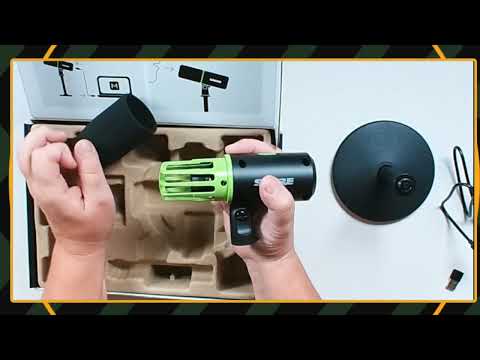
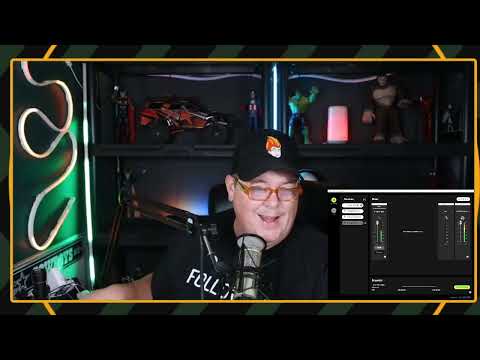
Shure calls its digital pop-filter system Digital Popper Stopper technology. I demonstrated the microphone’s built-in digital pop-filter behavior during short vocal takes, so this is more than a bullet point in a listing. It is a real part of the MV6’s intended workflow.
The practical benefit is convenience. Beginners frequently add a foam windscreen or a separate pop filter because they are cheap insurance against plosives. Those accessories can still be useful, especially if you work very close to the mic. But an integrated option means you can begin with fewer pieces on the desk and less friction during setup.
The feature is especially relevant for spoken-word work because plosives are one of the first issues new users notice when they listen back. It will not change the fact that speech technique and position affect the result. Instead, it gives the microphone a processing-oriented answer to a common problem while keeping the starter setup uncluttered.
Shure also says the MV6 includes Smart DSP features such as Auto Level Mode and a real-time denoiser. Those could be valuable for creators who do not want to ride input level or clean up every recording manually. I did not separately test those functions, so treat them as manufacturer-described tools rather than a result I can quantify here.
That uncertainty is not a reason to dismiss the extra tools. It is a reason to rank them correctly. The demonstrated USB-C connection and digital pop-filter behavior are the evidence I would put at the top of the buying case. Auto level, denoising, and other processing may add to the experience, but check their current requirements and decide whether you need them before making them the reason you choose this model.
+ Pros
- Straightforward USB-C plug-and-play workflow was demonstrated.
- Built-in digital pop-filter behavior was demonstrated during short vocal takes.
- Shure lists a focused set of voice-oriented DSP and monitoring features.
! What to know
- The demonstrated workflow supports direct USB-C setup; operating-system compatibility should be checked for your computer.
- I did not separately test Shure’s Auto Level Mode, denoiser, Voice Isolation Technology, headphone monitoring, or MOTIV Mix app.
- A built-in digital pop filter helps simplify the setup, but basic mic placement still matters for spoken-word audio.
Who should buy the Shure MV6?
Buy this USB-C podcast microphone if:
- You are starting a podcast and want to connect directly to a computer without buying an audio interface.
- You make streams, tutorials, remote interviews, voiceovers, or online lessons where a simple desktop voice setup matters more than a modular studio rig.
- You value built-in vocal-processing options and want the digital pop-filter workflow available from the start.
- You prefer a recognizable microphone brand with a focused speech-and-streaming feature set.
- You want to spend your early sessions learning your recording routine rather than assembling an audio chain.
Look elsewhere if: your plan is specifically to build around XLR gear, external preamps, and a mixer from day one. That is a valid path, but it is a different path. The MV6 is about reducing the steps between opening the box and recording a voice.
You may also want a different option if your purchase depends on confirmed performance in a difficult room, confirmed operating-system support, or a particular desktop-app workflow. I did not separately test those areas here. A USB-C microphone can be a great fit for a first setup, but a feature that is central to your work should be verified for your own computer and recording situation.
Features Shure lists beyond the basic setup
Shure identifies the MV6 as a dynamic cardioid USB microphone with Voice Isolation Technology. The company says this design is intended to reduce distractions such as keyboard noise, fans, and room echo. Dynamic cardioid microphones are commonly chosen for close-mic speech, but your room still has a vote. A bare office with hard walls behaves very differently from a treated studio.
Shure also lists a 3.5 mm headphone output for zero-latency monitoring and a tap-to-mute control. On paper, those are exactly the kind of desktop conveniences streamers and remote presenters appreciate. The company further says its MOTIV Mix desktop app offers microphone and monitor-mix customization. I did not independently use the headphone monitoring, mute control, or app here, so check current platform support and workflow requirements before treating those extras as your deciding factor.
For a prospective buyer, these manufacturer-listed features make the MV6 more than a bare USB microphone on paper. They suggest an all-in-one desktop direction: connection, speech-oriented processing, monitoring, and software adjustment in one product category. Still, the demonstrated case remains narrower and clearer. I can speak to the direct setup and digital pop-filter behavior; the remaining features should be evaluated as claims to confirm against your needs.
This is also why I would avoid over-reading the “gaming” label. Streaming and gaming are obvious applications for a desktop USB mic, but the same listed conveniences can matter for narration, online classes, video calls, and beginner podcasting. Choose it for the simple voice workflow, not because a category word on the product name implies a specific use case.
Specs
| Spec | Detail |
|---|---|
| Product | Shure MV6 USB Gaming Microphone for Streaming & Recording |
| Connection | USB-C |
| Microphone design | Dynamic cardioid (manufacturer claim) |
| Pop filtering | Digital Popper Stopper technology (manufacturer claim) |
| DSP | Auto Level Mode and real-time denoiser listed by Shure |
| Noise-focused feature | Voice Isolation Technology (manufacturer claim) |
| Headphone output | 3.5 mm, described by Shure as zero-latency monitoring |
| Controls | Tap-to-mute control (manufacturer claim) |
| Desktop software | MOTIV Mix app support listed by Shure |
Scorecard
Direct USB-C plug-and-play workflow was demonstrated.
Built-in digital pop-filter behavior adds useful simplicity.
Shure lists DSP, mute, monitoring, and app controls.
No verified price or direct comparison was available.
Shure makes relevant claims, but I did not separately test them.
Shure MV6 buying decision
Do not overthink the first microphone purchase. If you need an easy computer-based voice setup, a USB mic with a straightforward connection is often the right call. The MV6’s demonstrated plug-and-play workflow is the meaningful evidence here, and the built-in digital pop-filter behavior adds a practical speech-focused feature rather than another accessory to manage.
I would frame the MV6 as a convenience-first choice. It is not the right purchase because the word “gaming” appears in its name. It is the right purchase if you want to spend less time assembling an audio system and more time recording, streaming, or publishing.
For beginning podcasters, that convenience can be more valuable than a long list of theoretical upgrade paths. A microphone that is easy to connect and use fits the basic task well: getting clear, repeatable spoken-word sessions underway. If your needs later expand toward a larger audio chain, you can reassess then. There is no rule that says a first microphone must solve every future studio goal.
My recommendation therefore has a clear boundary. Consider the MV6 when direct USB-C setup and an integrated digital pop-filter workflow are your priorities. Do not choose it on the assumption that its listed denoising, isolation, monitoring, or app capabilities will solve a specific issue without checking those details first. That is the most realistic way to match this microphone to the right buyer.
Frequently asked questions
Is the Shure MV6 good for podcasting?
It is aimed at a simple computer-based spoken-word workflow. I demonstrated its USB-C plug-and-play setup and built-in digital pop-filter behavior, both of which are relevant to beginner podcasting. Shure also lists speech-focused DSP tools, although I did not separately test them.
Does the Shure MV6 need an audio interface?
No audio interface is part of the basic workflow I demonstrated. The MV6 uses USB-C for direct computer connection.
Does the Shure MV6 have a pop filter?
It has a built-in digital pop-filter feature. Shure refers to its processing as Digital Popper Stopper technology, and I demonstrated the microphone’s digital pop-filter behavior in short vocal recordings.
Can I monitor with headphones on the MV6?
Shure says the MV6 includes a 3.5 mm headphone output for zero-latency monitoring. I did not independently evaluate that monitoring function in this review.
Will the MV6 remove keyboard and fan noise?
Shure says its Voice Isolation Technology is intended to reduce keyboard noise, fan noise, room echo, and other distractions. Actual results depend on your room, microphone position, and noise source, and I did not separately test those conditions.
Final recommendation
The Shure MV6 is worth considering when the goal is simple: plug a microphone into a computer, speak naturally, and avoid turning the first recording session into an equipment project. I liked the straightforward workflow I demonstrated, and the built-in digital pop-filter behavior is a sensible convenience for close vocal work. If those are your priorities, it is a focused, practical USB-C microphone option.
The strongest reason to buy is not an unverified promise about every recording environment. It is the straightforward route from computer connection to a spoken-word recording workflow. For newcomers deciding between a simple USB-C podcast microphone and a more involved interface-based setup, that focus makes the MV6 easy to understand.
As an Amazon Associate I earn from qualifying purchases.