FIFINE D6 Stream Controller: A Solid Desk Start
The FIFINE AmpliGame D6 gets the physical basics right: tactile controls, a stable base, and a USB-C cable with a built-in USB adapter.
Affiliate disclosure: As an Amazon Associate I earn from qualifying purchases. This article may contain affiliate links, which means I may earn a commission at no extra cost to you.
The FIFINE D6 stream controller makes its case before I assign a single shortcut. I like the solid one-piece body, the buttons give me a definite tactile press, and the included cable solves a genuinely practical connection problem by putting a USB-C-to-USB converter directly in the cable. For a compact controller that will sit in front of a keyboard and get pressed often, those are meaningful starting points.
My hands-on look was focused on the hardware, its first power-up, and its lighting behavior. I connected it to a computer and saw the control-deck display come alive, but I also confirmed the important caveat: the D6 will not perform actions until it is programmed. That is normal territory for a programmable controller, yet it matters for anyone expecting useful streaming controls the instant the cable is connected.
The FIFINE AmpliGame D6 is a promising compact control deck with tactile buttons, a stable one-piece build, and an unusually useful USB-C-to-USB cable adapter. Just know that it needs programming before it can run your shortcuts.
As an Amazon Associate I earn from qualifying purchases.
The D6 is best understood as a compact physical control surface for a streaming or desktop setup. Its usefulness will ultimately depend on what software supports your particular computer and the actions you want available at your desk. I did not configure a complete workflow in this hands-on look, so I cannot say how its software handles specific apps, macros, profiles, or integrations. What I can say is that the physical foundation is sensible: it connects over USB-C, stays planted with rubber pads, and gives clear feedback when I press a button.
| Product type | Compact programmable stream controller |
|---|---|
| Connection | USB-C on the controller |
| Included cable | USB-C cable with built-in USB-C-to-USB converter |
| Controls | Physical tactile buttons |
| Desk stability | Rubber pads around the base |
| Lighting | Multiple RGB looks via rear button |
Why the FIFINE D6 stream controller starts strong
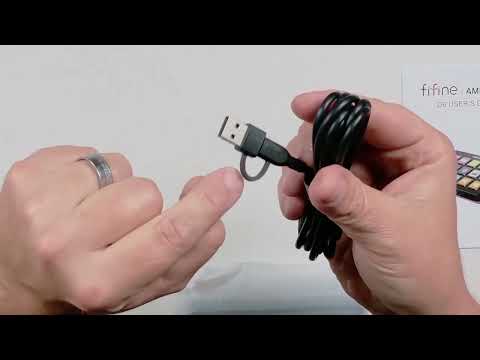
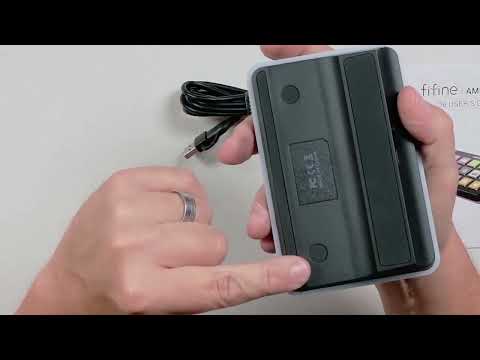
I unboxed the D6 and found the controller, a user guide, and the included cable. The cable stood out immediately. It has a USB-C-to-USB converter built into it, so it can accommodate a computer connection without making me locate a separate adapter first.
That detail is more useful than it sounds. USB-C is the connection on the controller, but a desktop setup does not always have an unused USB-C port. In my own setup, a competing controller had required a separate converter because I did not have enough USB-C ports available. With the D6 cable, the converter is already there. I can use the connection I have rather than treating an adapter as another item to buy, keep track of, or leave attached to a cable somewhere else.
It is a small inclusion, but it addresses a real point of friction in a streaming desk setup. Controllers are meant to simplify recurring tasks. Starting with an included cable that is prepared for either kind of computer port is a better experience than opening the box and realizing the connection is not immediately workable for the available ports.
The controller itself also made a good initial impression. I found it to be an all-in-one piece, with nothing that seemed loose or likely to pop off while I handled it. I am not making a long-term durability claim from an initial hands-on session, but the immediate construction felt cohesive rather than fussy. That matters on a device designed to remain within arm’s reach and be used repeatedly through a stream or work session.
There is a difference between a product feeling elaborate and feeling dependable. The D6 does not need loose accessories or moving exterior pieces to make its point. The practical takeaway from my first handling was simple: it felt like a single desk device rather than a collection of parts I would need to baby.
Physical buttons are the D6’s clearest streaming advantage
The D6 uses physical buttons, and I found them easy to use. More importantly, they are tactile. When I pushed one, I could feel the press. That direct physical response is the feature I want from a controller that may be used while I am watching a monitor, speaking, or dealing with several things at once.
A controller is not just about putting commands into a smaller space. It should make a command feel deliberate. A noticeable press gives me confirmation that I activated a button rather than merely brushed a surface or wondered whether a touch registered. That does not establish how any individual command will be configured, but it does establish a good hardware basis for commands that need to be close at hand.
For streaming, that can be attractive if you prefer a clear physical interaction over a touch-first interface. For broader desktop use, the same preference applies: if the goal is to keep recurring actions accessible without reaching for the keyboard every time, a button that communicates its press is a straightforward benefit.
I also looked at the bottom of the controller and found rubber pads around the unit. Those pads should help it resist sliding around on a desk when I press the controls. This is another unglamorous design choice that matters more in daily use than it does in a product photo. A controller should stay where I place it. It should not shift every time I use a button, especially when it is positioned beside a keyboard, microphone, or other streaming equipment.
Put together, the tactile buttons and rubberized base point to the same design priority: stable, deliberate desk operation. The D6 does not have to be complicated to deliver that. It just needs to remain in place and give me a clear indication when I have pressed something, and those are both areas where it made a positive first impression.
Connection and first power-up: what I saw
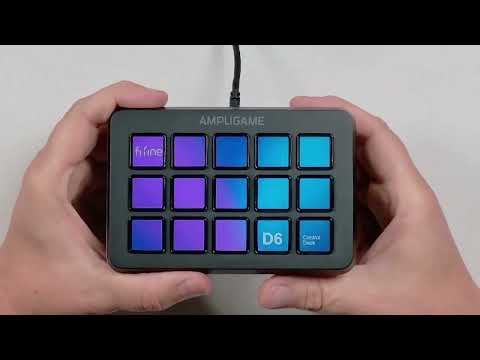
The D6 has a USB-C connection on the controller. After I connected it to my computer, it powered up and the control-deck display became active. That is the point at which the device begins to feel like a controller rather than just a piece of desk hardware: it is connected, lit, and ready for the software side of setup.
However, powering up is not the same as being ready to run a workflow. At this stage, it was not going to do anything because it had not been programmed. I consider that the most important expectation to set before buying. The D6 is a programmable controller, not a preconfigured collection of commands for every streaming setup.
In practical terms, I would plan for a setup step after connection. The relevant software needs to be installed, and the controller needs assignments before it can perform the actions I want. The exact assignments, software experience, supported services, key customization, folders, profiles, and macro workflow were not established in this hands-on session. If one of those details decides whether the D6 fits your setup, verify it for your computer and preferred streaming tools before ordering.
That caution is not a reason to dismiss the device. Programming is the reason a control deck can be personal to a desk setup rather than locked into a single use. But it does mean the buyer who will be happiest with the D6 is someone prepared to do that configuration work. If you want a product to perform meaningful shortcuts the moment it is plugged in, my experience does not support that expectation.
For someone comfortable setting up a controller, the physical observations are encouraging. The connection is USB-C, the cable includes its own converter for standard USB ports, the hardware powered up when connected, and the buttons have a defined feel. The unanswered part is how far the software can take a particular workflow, not whether the unit itself can be connected and brought to life at the desk.
RGB lighting is a simple extra, not the buying reason
I noticed a button on the device that I initially thought might be a power or brightness button. After pressing the rear button, I saw it cycle through different built-in RGB lighting looks. Each press changed the overall lighting vibe, giving the controller several visual options without requiring me to dig into a menu during this first look.
That makes the D6 easier to fit into a desk setup where lighting matters. I would treat the RGB behavior as a convenience rather than the central reason to buy a stream controller. The useful parts remain the buttons, stability, cable, and eventual programming. Still, it is nice that the lighting can be changed directly from the device.
I did not confirm any function for that rear button beyond the observed RGB-lighting changes. So I would not assume it also serves as a dedicated power, brightness, or other control. What I directly observed was multiple lighting looks, and that is the feature I would count on.
Who the D6 makes sense for
I would consider the FIFINE AmpliGame D6 if I wanted a compact controller with physical buttons and I valued practical hardware details over a complicated first impression. It is especially appealing for a desk where USB-C ports are scarce but standard USB is available, because the included cable’s built-in converter removes a common connection annoyance.
- Streamers who prefer physical feedback: The buttons have a noticeable tactile press, so I could feel when I activated one.
- Desktop users with limited USB-C ports: The included cable incorporates a USB-C-to-USB converter rather than requiring a separate adapter.
- People who want a controller to stay put: Rubber pads around the bottom should help limit desk movement during normal use.
- Buyers who like a clean, unified device: The one-piece construction felt solid in my handling, with no loose exterior parts noticed.
- Users willing to configure their own workflow: The D6 needs programming before it can run actions, so it suits someone prepared to set it up.
I would be more cautious if my purchase depends on confirmed support for a specific operating system, streaming application, service, profile structure, or shortcut type. I did not test those areas here. A physical controller can feel excellent but still be the wrong pick if its software does not suit the apps you rely on, so compatibility should be the final check rather than an assumption.
+ Pros
- Included cable has a built-in USB-C-to-USB converter
- One-piece construction felt solid with no loose parts
- Buttons provide clear tactile press feedback
- Rubber base pads help keep the controller stable
- Rear button cycles through multiple RGB lighting looks
! What to know
- The controller needs to be programmed before it can run actions.
- Confirm compatibility with your specific streaming software and operating system before buying.
- The rear button changes RGB lighting modes; its other possible functions were not confirmed.
What to check before choosing the FIFINE D6
My main advice is to separate the known hardware experience from the software questions that remain. I directly handled the controller, cable, buttons, base, connection, and lighting control. Those parts support a positive first impression. I did not establish how the D6 works with OBS Studio, Streamlabs, Twitch, YouTube, or other specific services, and I did not configure a full collection of shortcuts.
Before making the D6 part of a live-streaming rig, check that its current software supports your operating system and the apps that matter most to you. If your workflow depends on scene changes, audio actions, launching a tool, or a particular macro behavior, confirm the available setup options for that use. The controller’s value comes after programming, so this is the area where matching the product to your existing workflow matters most.
Also consider the kind of user experience you prefer. Some buyers want a compact device they can connect and begin using immediately. The D6 powered up for me after connection, but it did not perform actions until programming was done. Others enjoy tailoring every button to their own habits; for those buyers, the need to configure it is simply part of owning a controller.
Finally, do not overread an initial hardware look as evidence of long-term reliability. I liked the solid one-piece feel and noticed no loose components, but button lifespan and long-term durability were not established. The fair takeaway is that the D6 starts with a stable, tactile physical design and asks the buyer to do sensible compatibility homework on the software side.
Specs
| Spec | Detail |
|---|---|
| Model | FIFINE AmpliGame D6 Stream Controller |
| Controller connection | USB-C |
| Included items | Controller, user guide, and cable |
| Cable adapter | Built-in USB-C-to-USB converter |
| Button style | Physical tactile buttons |
| Base | Rubberized anti-slip pads |
| Lighting control | Rear button cycles RGB lighting looks |
Scorecard
Solid one-piece construction with no loose parts noticed.
Tactile presses give clear physical confirmation.
Rubber pads should help prevent sliding.
Included cable has a useful built-in USB adapter.
It must be programmed before it can perform actions.
FIFINE D6 stream controller FAQ
Does the FIFINE D6 work as soon as you plug it in?
It powered up and its control-deck display became active when I connected it to a computer. It did not perform actions until it had been programmed.
Does the D6 include a cable?
Yes. I found a cable in the box along with the controller and user guide. The cable has a built-in USB-C-to-USB converter, which is useful when standard USB is available but USB-C ports are limited.
Are the buttons on the FIFINE AmpliGame D6 tactile?
Yes. I found the buttons easy to use, with a noticeable physical press. That tactile feedback helped me feel that I had pushed a button.
Does the FIFINE D6 have RGB lighting?
Yes. Pressing the rear button cycled through multiple built-in RGB lighting looks. I did not confirm another function for that button beyond changing the lighting.
Will the D6 slide around on a desk?
The bottom has rubber pads around it that should help keep the controller from sliding during normal desk use.
Does the FIFINE D6 work with OBS Studio?
I did not configure or confirm OBS Studio integration in this hands-on look. Check current compatibility and setup requirements for your specific computer and streaming workflow before buying.
Final take on the FIFINE D6 stream controller
The FIFINE AmpliGame D6 gets the unglamorous physical details right. It felt solid and all-in-one in my hands, the buttons offered a clear tactile response, rubber pads should help it remain steady on the desk, and the cable’s built-in converter is a more thoughtful inclusion than it may sound at first.
My biggest buyer reminder is equally simple: this is not a controller that performs actions before it is set up. It powered on after I connected it, but programming is required. I would verify the software support your own streaming or desktop workflow needs, particularly if a specific app or integration is non-negotiable.
If those compatibility checks line up and you want a compact physical control deck with a practical connection solution, the D6 has a strong hardware starting point. The RGB lighting is a pleasant extra, but the real appeal is the tactile, stable, one-piece design that is ready to become useful once you make it your own.
As an Amazon Associate I earn from qualifying purchases.